This time we’re going bigger than ever. Fabric, Power BI, SQL, AI and more. We're covering it all. You won't want to miss it.
Learn moreDid you hear? There's a new SQL AI Developer certification (DP-800). Start preparing now and be one of the first to get certified. Register now
Hi, we have two tables in pbix, "Table1" and "Table2".
can anyone help me writing a "Measure" for this requirement? that can replace table 1 values with table 2 (there is no relatonship between tables).
Thanks in advance.
Solved! Go to Solution.
Hi @yodha ,
Please check:
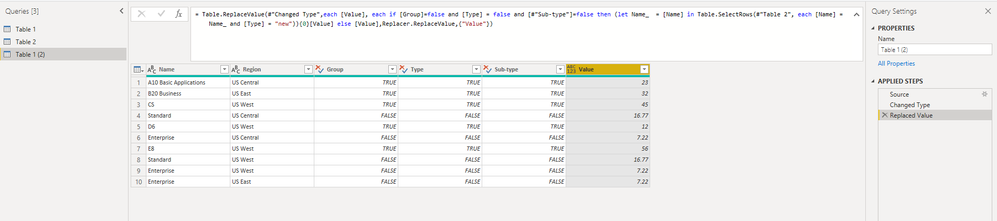
1. Try to replace value in Power Query editor.
= Table.ReplaceValue(#"Changed Type",each [Value], each if [Group]=false and [Type] = false and [#"Sub-type"]=false then (let Name_ = [Name] in Table.SelectRows(#"Table 2", each [Name] = Name_ and [Type] = "new")){0}[Value] else [Value],Replacer.ReplaceValue,{"Value"})
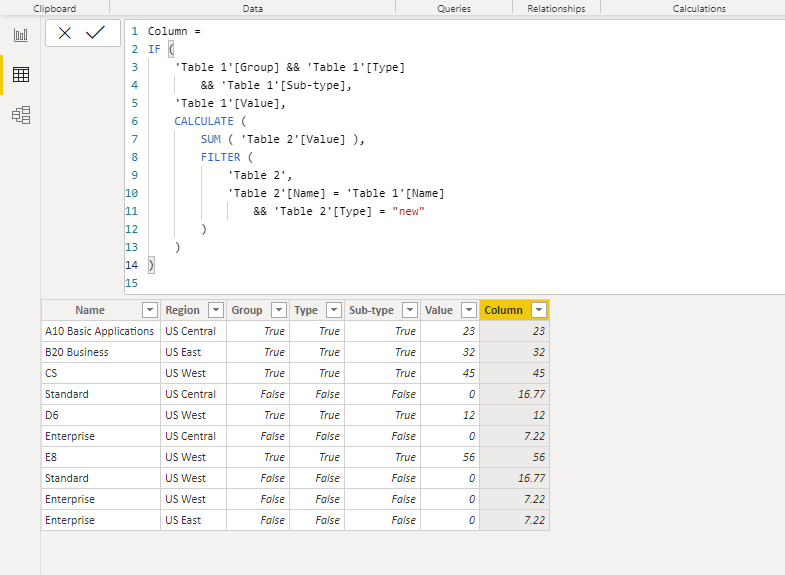
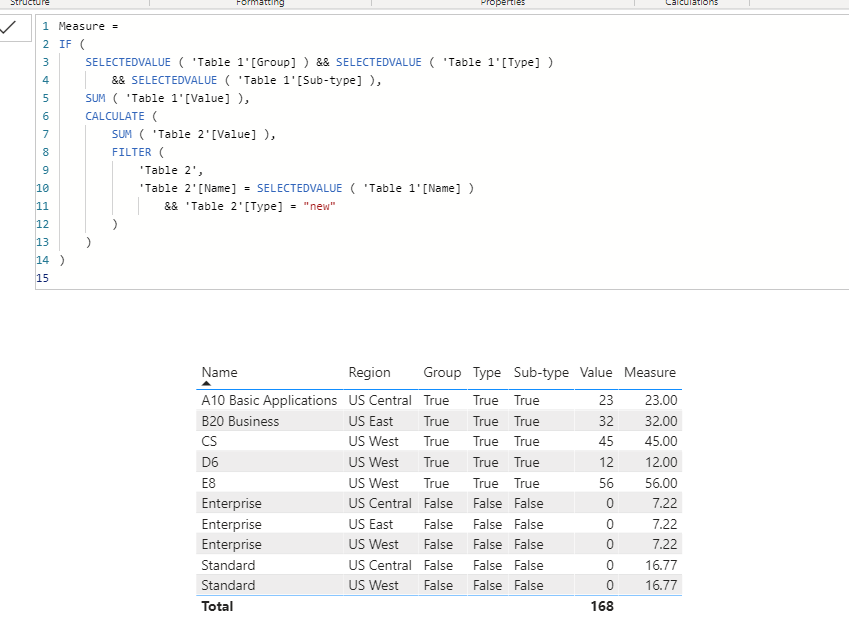
2. Or you can create a calculated column or a measure in Power BI Desktop.
Column =
IF (
'Table 1'[Group] && 'Table 1'[Type]
&& 'Table 1'[Sub-type],
'Table 1'[Value],
CALCULATE (
SUM ( 'Table 2'[Value] ),
FILTER (
'Table 2',
'Table 2'[Name] = 'Table 1'[Name]
&& 'Table 2'[Type] = "new"
)
)
)
Measure =
IF (
SELECTEDVALUE ( 'Table 1'[Group] ) && SELECTEDVALUE ( 'Table 1'[Type] )
&& SELECTEDVALUE ( 'Table 1'[Sub-type] ),
SUM ( 'Table 1'[Value] ),
CALCULATE (
SUM ( 'Table 2'[Value] ),
FILTER (
'Table 2',
'Table 2'[Name] = SELECTEDVALUE ( 'Table 1'[Name] )
&& 'Table 2'[Type] = "new"
)
)
)
BTW, .pbix file attached.
Best Regards,
Icey
If this post helps, then please consider Accept it as the solution to help the other members find it more quickly.
Hi @yodha ,
I would go step by step.
1. Generate columns in table 2 that you need to link to table 1. (Conditional Columns)
2. Merge the tables over these columns together.
3. Find the desired value using a conditional column.
Take a look at the attached PBIX.
Marcus Wegener works as Full Stack Power BI Engineer at BI or DIE.
His mission is clear: "Get the most out of data, with Power BI."
twitter - LinkedIn - YouTube - website - podcast - Power BI Tutorials
Hi @yodha ,
Please check:
1. Try to replace value in Power Query editor.
= Table.ReplaceValue(#"Changed Type",each [Value], each if [Group]=false and [Type] = false and [#"Sub-type"]=false then (let Name_ = [Name] in Table.SelectRows(#"Table 2", each [Name] = Name_ and [Type] = "new")){0}[Value] else [Value],Replacer.ReplaceValue,{"Value"})
2. Or you can create a calculated column or a measure in Power BI Desktop.
Column =
IF (
'Table 1'[Group] && 'Table 1'[Type]
&& 'Table 1'[Sub-type],
'Table 1'[Value],
CALCULATE (
SUM ( 'Table 2'[Value] ),
FILTER (
'Table 2',
'Table 2'[Name] = 'Table 1'[Name]
&& 'Table 2'[Type] = "new"
)
)
)
Measure =
IF (
SELECTEDVALUE ( 'Table 1'[Group] ) && SELECTEDVALUE ( 'Table 1'[Type] )
&& SELECTEDVALUE ( 'Table 1'[Sub-type] ),
SUM ( 'Table 1'[Value] ),
CALCULATE (
SUM ( 'Table 2'[Value] ),
FILTER (
'Table 2',
'Table 2'[Name] = SELECTEDVALUE ( 'Table 1'[Name] )
&& 'Table 2'[Type] = "new"
)
)
)
BTW, .pbix file attached.
Best Regards,
Icey
If this post helps, then please consider Accept it as the solution to help the other members find it more quickly.
Hi @yodha ,
Why don't you use Power Query?
Marcus Wegener works as Full Stack Power BI Engineer at BI or DIE.
His mission is clear: "Get the most out of data, with Power BI."
twitter - LinkedIn - YouTube - website - podcast - Power BI Tutorials
@mwegener Yeah, Powerquery also works, but am new to power BI and dont know how to get expected result using power query.Thank you!
Hi @yodha ,
I would go step by step.
1. Generate columns in table 2 that you need to link to table 1. (Conditional Columns)
2. Merge the tables over these columns together.
3. Find the desired value using a conditional column.
Take a look at the attached PBIX.
Marcus Wegener works as Full Stack Power BI Engineer at BI or DIE.
His mission is clear: "Get the most out of data, with Power BI."
twitter - LinkedIn - YouTube - website - podcast - Power BI Tutorials
Check out the April 2026 Power BI update to learn about new features.
If you have recently started exploring Fabric, we'd love to hear how it's going. Your feedback can help with product improvements.
| User | Count |
|---|---|
| 36 | |
| 33 | |
| 31 | |
| 21 | |
| 16 |
| User | Count |
|---|---|
| 66 | |
| 56 | |
| 31 | |
| 26 | |
| 23 |