Join us at FabCon Atlanta from March 16 - 20, 2026, for the ultimate Fabric, Power BI, AI and SQL community-led event. Save $200 with code FABCOMM.
Register now!Get Fabric Certified for FREE during Fabric Data Days. Don't miss your chance! Request now
(day(numberic value) of the end date - (( no of weeks between firt day of the date supplied and end date)*2)-(if first day of the month is sunday then 1 else 0) - (if date is saturday then 1 else 0))
*
((remaing days in the month from the date supplied) - ((no of weeks from date supplied and last day of the month)*2) - (if end date is sunday then 1 else 0) - (ifd end date of the month is saturday then 1 else 0))
End date: 03-Jul-2019 (Wednesday)
Running Estimate value:
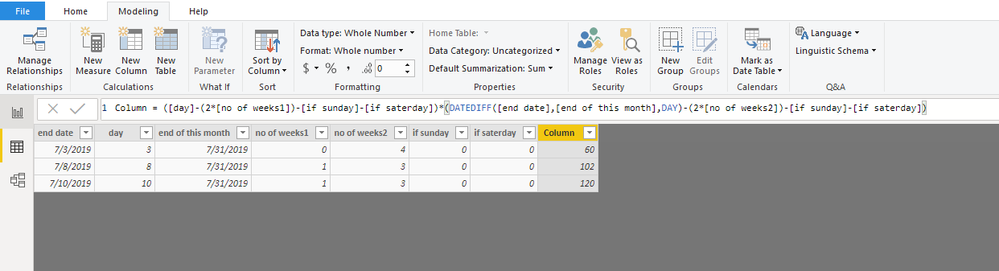
(3-(0 Weeks *2) - 0 - 0) * (28 - (4*2) - 0-0) = 60
3means enddate -(0 weeks means before 3rd date there is no this month weeks *2)-(0 means before 3rd date there is no any sundayof first week -0means before 3rd date there is no any saturday of first week) * (28means july month of dates 31-3=28 -(4*2 means 28th date of how many weeks there is july month -0 means before 3rd date there is no any sundayof first week -0means before 3rd date there is no any saturday of first week)=60
Note : multifly need *2 doesn't matter
Solved! Go to Solution.
Hi @Anonymous
Create a calendar table and connect it with your table
calendar = CALENDARAUTO()
Create columns
day = DAY([end date])
end of this month = ENDOFMONTH('calendar'[Date])
no of weeks1 = INT([day]/7)
no of weeks2 = INT((DAY([end of this month])-[day])/7)
if sunday = var weekday=WEEKDAY([end date],2) return IF(weekday=7,1,0)
if saterday = var weekday=WEEKDAY([end date],2) return IF(weekday=6,1,0)
Column =
( [day] - ( 2 * [no of weeks1] ) - [if sunday] - [if saterday] )
* (
DATEDIFF ( [end date], [end of this month], DAY ) - ( 2 * [no of weeks2] ) - [if sunday] - [if saterday]
)
Best Regards
Maggie
Community Support Team _ Maggie Li
If this post helps, then please consider Accept it as the solution to help the other members find it more quickly.
Hi @Anonymous
Create a calendar table and connect it with your table
calendar = CALENDARAUTO()
Create columns
day = DAY([end date])
end of this month = ENDOFMONTH('calendar'[Date])
no of weeks1 = INT([day]/7)
no of weeks2 = INT((DAY([end of this month])-[day])/7)
if sunday = var weekday=WEEKDAY([end date],2) return IF(weekday=7,1,0)
if saterday = var weekday=WEEKDAY([end date],2) return IF(weekday=6,1,0)
Column =
( [day] - ( 2 * [no of weeks1] ) - [if sunday] - [if saterday] )
* (
DATEDIFF ( [end date], [end of this month], DAY ) - ( 2 * [no of weeks2] ) - [if sunday] - [if saterday]
)
Best Regards
Maggie
Community Support Team _ Maggie Li
If this post helps, then please consider Accept it as the solution to help the other members find it more quickly.
@Anonymous Read this post to get your answer quickly.
https://community.powerbi.com/t5/Community-Blog/How-to-Get-Your-Question-Answered-Quickly/ba-p/38490
Subscribe to the @PowerBIHowTo YT channel for an upcoming video on List and Record functions in Power Query!!
Learn Power BI and Fabric - subscribe to our YT channel - Click here: @PowerBIHowTo
If my solution proved useful, I'd be delighted to receive Kudos. When you put effort into asking a question, it's equally thoughtful to acknowledge and give Kudos to the individual who helped you solve the problem. It's a small gesture that shows appreciation and encouragement! ❤
Did I answer your question? Mark my post as a solution. Proud to be a Super User! Appreciate your Kudos 🙂
Feel free to email me with any of your BI needs.
Check out the November 2025 Power BI update to learn about new features.
Advance your Data & AI career with 50 days of live learning, contests, hands-on challenges, study groups & certifications and more!