
cancel
Showing results for 
Search instead for 
Did you mean: 

Learn from the best! Meet the four finalists headed to the FINALS of the Power BI Dataviz World Championships! Register now

Reply
Anonymous
Not applicable

How to write DAX statement using where condition

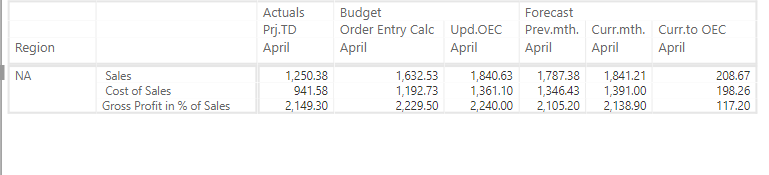
Here is the visual of power BI report shown below for summary table.

The Actual, budget values are summing up for Sales, Cost of Sales, Gross Profit in % of Sales. 

But I am looking for an average of values for Report Parameter "Gross Profit in % of Sales". 

How to write the DAX formula for a new measured Value (which summarizes Sales, Cost of Sales, and averages Gross profit in % of Sales) 

PS: The Report parameter is varchar type, Sales are in decimal type.


Capture.PNG


Any help will be appreciated, thank you 


1 ACCEPTED SOLUTION
Anonymous
Not applicable

Looks like your column in Level 2 has 3 values, and you are using just 1 measure.


You cannot change the measure properties of 1 of the row values. (To show 2  rows as sum and one row as percentage)


View solution in original post

4 REPLIES 4
v-juanli-msft
Community Support
Community Support

Hi @Anonymous

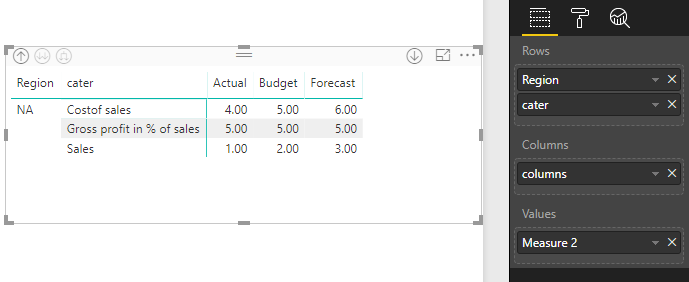
Assume your dataset is like this

3.png

Then create a new measure to calculate an average of values for Report Parameter "Gross Profit in % of Sales".

Measure 2 = IF(MAX([cater])="Gross profit in % of sales",AVERAGEX(ALL(Sheet1),[Measure]),[Measure])

4.png


Best Regards

Maggie

Anonymous
Not applicable

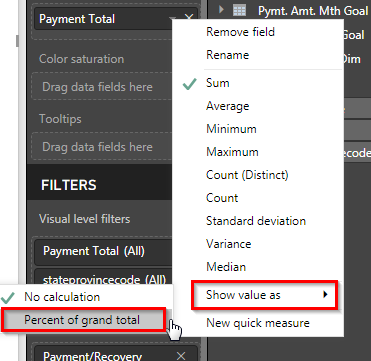
Have you tried "Percentage of Grandtotal" ?

percental grandtotal.png

Anonymous
Not applicable

@Anonymous, Yes when I try using show value as percentage of grand total, the other parameters (Sales, Cost of Sales) are changing as well. 


Capture.PNG


Anonymous
Not applicable

Looks like your column in Level 2 has 3 values, and you are using just 1 measure.


You cannot change the measure properties of 1 of the row values. (To show 2  rows as sum and one row as percentage)


Helpful resources

Announcements
Join our Fabric User Panel

Join our Fabric User Panel

Share feedback directly with Fabric product managers, participate in targeted research studies and influence the Fabric roadmap.

March Power BI Update Carousel

Power BI Community Update - March 2026

Check out the March 2026 Power BI update to learn about new features.