Join us at FabCon Atlanta from March 16 - 20, 2026, for the ultimate Fabric, Power BI, AI and SQL community-led event. Save $200 with code FABCOMM.
Register now!Get Fabric Certified for FREE during Fabric Data Days. Don't miss your chance! Request now
Hi,
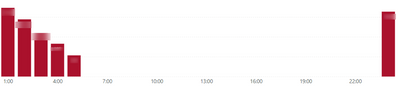
Right now I have a bar chart that goes as followed:
As you can see it shows the data from 24 till 05, however, I would like to have the bar that is all the way at the end at the beginning and remove the blanks.
How could this be done?
Solved! Go to Solution.
Hi @Anonymous ,
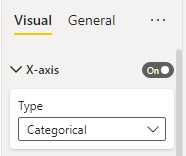
1. Please try to change the type of x-axis from continuous to categorical.
2. You can then click on the three dots at the top left of the visual to sort the axes or values.
Best Regards,
Gao
Community Support Team
If there is any post helps, then please consider Accept it as the solution to help the other members find it more quickly. If I misunderstand your needs or you still have problems on it, please feel free to let us know. Thanks a lot!
How to get your questions answered quickly -- How to provide sample data
Hi @Anonymous ,
1. Please try to change the type of x-axis from continuous to categorical.
2. You can then click on the three dots at the top left of the visual to sort the axes or values.
Best Regards,
Gao
Community Support Team
If there is any post helps, then please consider Accept it as the solution to help the other members find it more quickly. If I misunderstand your needs or you still have problems on it, please feel free to let us know. Thanks a lot!
How to get your questions answered quickly -- How to provide sample data
Check out the November 2025 Power BI update to learn about new features.
Advance your Data & AI career with 50 days of live learning, contests, hands-on challenges, study groups & certifications and more!