Join us at FabCon Atlanta from March 16 - 20, 2026, for the ultimate Fabric, Power BI, AI and SQL community-led event. Save $200 with code FABCOMM.
Register now!Get Fabric Certified for FREE during Fabric Data Days. Don't miss your chance! Request now
Hello
In Edit mode, how can we expand horizontally the space available to place visuals?
I would like to put more visuals below the current ones and it does not allow me to drag the border downwards.
Thanks!
Solved! Go to Solution.
Hi @Anonymous
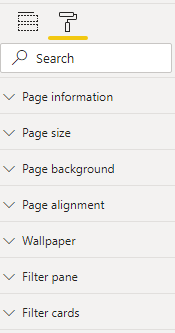
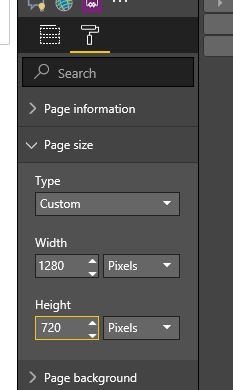
Click on the Page canvas and Go to Format > Page size > Custom and adjust it there
Hello @Anonymous,
Click on the blank white space of the report, click on Format Pane > Page size. You can change the size as you want.
Short answer: Don't do it. Users hate vertical scrolling. Put fewer visuals on your page.
@Anonymous
Best,
Paul
Hello @Anonymous,
Click on the blank white space of the report, click on Format Pane > Page size. You can change the size as you want.
Hi @Anonymous
Click on the Page canvas and Go to Format > Page size > Custom and adjust it there
Check out the November 2025 Power BI update to learn about new features.
Advance your Data & AI career with 50 days of live learning, contests, hands-on challenges, study groups & certifications and more!