Don't miss your chance to take the Fabric Data Engineer (DP-600) exam for FREE! Find out how by watching the DP-600 session on-demand now through April 28th.
Learn moreJoin the FabCon + SQLCon recap series. Up next: Power BI, Real-Time Intelligence, IQ and AI, and Data Factory take center stage. All sessions are available on-demand after the live show. Register now
There are two tables in Power BI, Table1 and Table2,
the data of Table1 comes from Database1 in Server1,
the data of Table2 comes from Database2 in Server2.
Table1 has columns: ID1, Value1
Table2 has columns: ID2, Value2
There is a one-to-one relationship between the two tables: ID1=ID2
But IDs in these two tables are not totally matched, for example:
Records in Table1:
ID1 Value1
1 A
2 B
3 C
4 D
Records in Table2:
ID2 Value2
1 A
3 C
5 E
Is it possible to create a new table Table3 in Power BI using SQL statement or other methods to get the diffrent records in Table1? All the records in Table3 come from Table1.
So Table3 should have following records:
2 B
4 D
Thanks.
Solved! Go to Solution.
Hi @j_w
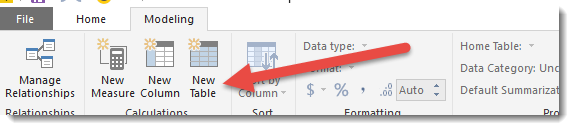
You can do this in a number of places. In Power BI you can create new tables using this button
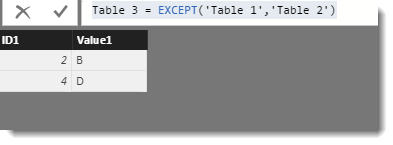
And just paste in the following DAX for your example
Table 3 = EXCEPT('Table 1','Table 2')
In Power Query you can simply merge (join) the tables with join type left anti (records in Table1 that don't exist in Table2).
This video illustrates how the code below is created.
let
Source = Table.NestedJoin(Table1,{"ID1"},Table2,{"ID2"},"NewColumn",JoinKind.LeftAnti),
#"Removed Columns" = Table.RemoveColumns(Source,{"NewColumn"})
in
#"Removed Columns"
Hi @j_w
You can do this in a number of places. In Power BI you can create new tables using this button
And just paste in the following DAX for your example
Table 3 = EXCEPT('Table 1','Table 2')
You can also do it in SQL but you will probably need a linked server between the two servers for the query to work.
There will also be a way you can do it in the Query Editor too @MarcelBeug will probably give you the best approach.
In Power Query you can simply merge (join) the tables with join type left anti (records in Table1 that don't exist in Table2).
This video illustrates how the code below is created.
let
Source = Table.NestedJoin(Table1,{"ID1"},Table2,{"ID2"},"NewColumn",JoinKind.LeftAnti),
#"Removed Columns" = Table.RemoveColumns(Source,{"NewColumn"})
in
#"Removed Columns"
Check out the April 2026 Power BI update to learn about new features.
If you have recently started exploring Fabric, we'd love to hear how it's going. Your feedback can help with product improvements.
A new Power BI DataViz World Championship is coming this June! Don't miss out on submitting your entry.
| User | Count |
|---|---|
| 42 | |
| 35 | |
| 35 | |
| 22 | |
| 15 |
| User | Count |
|---|---|
| 65 | |
| 58 | |
| 28 | |
| 27 | |
| 25 |