Get certified for free when you join Fabric Data Days 2026 and dive into Fabric, Power BI, SQL, AI, and other essential data skills.
Join nowJuly 7 - July 17 | Round 2 of the Power BI Dataviz World Championships. Don't miss your chance! Learn more
Hi, I have series of columns (40) for which I want to calculate variance with prior column. How do i use 'loop' in a function to get what I need? Is that a best approach, I may have 1M+ records.
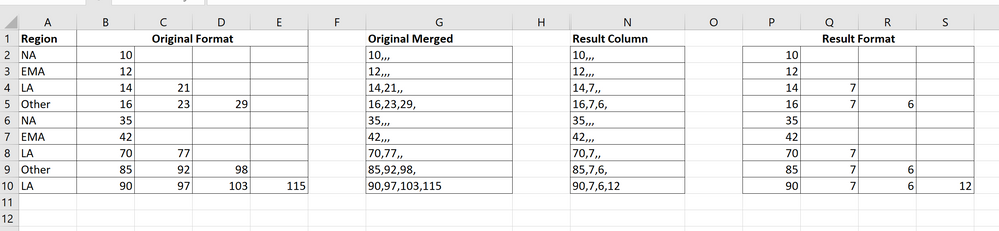
My original columns are in A thru E, I was planning to merge them in Column G (thought it was logical to perform loop on a string separated by comma).
Maybe use a function to get Column N and then split it to get desired Columns P thru S.
The values are incremant (Col B thru E)
Thank You
Solved! Go to Solution.
Hi @F75
Place the following M code in a blank query to see the steps.See it all at work in the attached file.
let
Source = Table.FromRows(Json.Document(Binary.Decompress(Binary.FromText("i45W8nNU0lEyNAASUBSrE63k6gsWNUIV9QELmgAJI0MkYf+SjNQikIwZSMYYRFjC5MCmG5tiM90Em+nmIIeYm2Mx3QJkiCVIj6UFihZLkBZLc7AvQJYbGpoqxcYCAA==", BinaryEncoding.Base64), Compression.Deflate)), let _t = ((type nullable text) meta [Serialized.Text = true]) in type table [Region = _t, Column2 = _t, Column3 = _t, Column4 = _t, Column5 = _t]),
#"Changed Type" = Table.TransformColumnTypes(Source,{{"Region", type text}, {"Column2", Int64.Type}, {"Column3", Int64.Type}, {"Column4", Int64.Type}, {"Column5", Int64.Type}}),
#"Unpivoted Other Columns" = Table.UnpivotOtherColumns(#"Changed Type", {"Region"}, "Attribute", "Value"),
#"Grouped Rows" = Table.Group(#"Unpivoted Other Columns", {"Region"}, {{"Grouped", each [Value] }}, GroupKind.Local),
#"Added Custom1" = Table.AddColumn(#"Grouped Rows", "Custom", each let aux1_ = [Grouped], aux2_ = {0} & List.RemoveLastN(aux1_,1), aux_ = List.Transform(List.Zip({aux1_, aux2_}), each _{0} - _{1}) in aux_),
#"Extracted Values" = Table.TransformColumns(#"Added Custom1", {"Custom", each Text.Combine(List.Transform(_, Text.From), ","), type text}),
#"Split Column by Delimiter" = Table.SplitColumn(#"Extracted Values", "Custom", Splitter.SplitTextByDelimiter(",", QuoteStyle.Csv), {"Custom.1", "Custom.2", "Custom.3", "Custom.4"}),
#"Changed Type1" = Table.TransformColumnTypes(#"Split Column by Delimiter",{{"Custom.1", Int64.Type}, {"Custom.2", Int64.Type}, {"Custom.3", Int64.Type}, {"Custom.4", Int64.Type}}),
#"Removed Columns" = Table.RemoveColumns(#"Changed Type1",{"Grouped"})
in
#"Removed Columns"
|
|
Please accept the solution when done and consider giving a thumbs up if posts are helpful. Contact me privately for support with any larger-scale BI needs, tutoring, etc. |
Hi @F75
Place the following M code in a blank query to see the steps.See it all at work in the attached file.
let
Source = Table.FromRows(Json.Document(Binary.Decompress(Binary.FromText("i45W8nNU0lEyNAASUBSrE63k6gsWNUIV9QELmgAJI0MkYf+SjNQikIwZSMYYRFjC5MCmG5tiM90Em+nmIIeYm2Mx3QJkiCVIj6UFihZLkBZLc7AvQJYbGpoqxcYCAA==", BinaryEncoding.Base64), Compression.Deflate)), let _t = ((type nullable text) meta [Serialized.Text = true]) in type table [Region = _t, Column2 = _t, Column3 = _t, Column4 = _t, Column5 = _t]),
#"Changed Type" = Table.TransformColumnTypes(Source,{{"Region", type text}, {"Column2", Int64.Type}, {"Column3", Int64.Type}, {"Column4", Int64.Type}, {"Column5", Int64.Type}}),
#"Unpivoted Other Columns" = Table.UnpivotOtherColumns(#"Changed Type", {"Region"}, "Attribute", "Value"),
#"Grouped Rows" = Table.Group(#"Unpivoted Other Columns", {"Region"}, {{"Grouped", each [Value] }}, GroupKind.Local),
#"Added Custom1" = Table.AddColumn(#"Grouped Rows", "Custom", each let aux1_ = [Grouped], aux2_ = {0} & List.RemoveLastN(aux1_,1), aux_ = List.Transform(List.Zip({aux1_, aux2_}), each _{0} - _{1}) in aux_),
#"Extracted Values" = Table.TransformColumns(#"Added Custom1", {"Custom", each Text.Combine(List.Transform(_, Text.From), ","), type text}),
#"Split Column by Delimiter" = Table.SplitColumn(#"Extracted Values", "Custom", Splitter.SplitTextByDelimiter(",", QuoteStyle.Csv), {"Custom.1", "Custom.2", "Custom.3", "Custom.4"}),
#"Changed Type1" = Table.TransformColumnTypes(#"Split Column by Delimiter",{{"Custom.1", Int64.Type}, {"Custom.2", Int64.Type}, {"Custom.3", Int64.Type}, {"Custom.4", Int64.Type}}),
#"Removed Columns" = Table.RemoveColumns(#"Changed Type1",{"Grouped"})
in
#"Removed Columns"
|
|
Please accept the solution when done and consider giving a thumbs up if posts are helpful. Contact me privately for support with any larger-scale BI needs, tutoring, etc. |
Join us in Barcelona for FabCon and SQLCon, the Fabric, Power BI, SQL, and AI community event. Save €200 with code FABCMTY200.
Join Data Days 2026: 60 days of free live/on-demand sessions, challenges, study groups, and certification opportunities.
| User | Count |
|---|---|
| 28 | |
| 23 | |
| 18 | |
| 18 | |
| 15 |
| User | Count |
|---|---|
| 47 | |
| 44 | |
| 43 | |
| 35 | |
| 32 |