cancel
Showing results for 
Search instead for 
Did you mean: 

Learn from the best! Meet the four finalists headed to the FINALS of the Power BI Dataviz World Championships! Register now

Reply
lalithakiran
Regular Visitor

How to update another graphs using drill down method?

HI,

My client wants to see drill down approach about feedback for each month.

Approach is Months (Jan, feb, March etc)-> Once i click March its showing application like MS.NET , SharePoint ->  once i click SharePoint, which display individual ticket count wise.

How can i achive this functionality

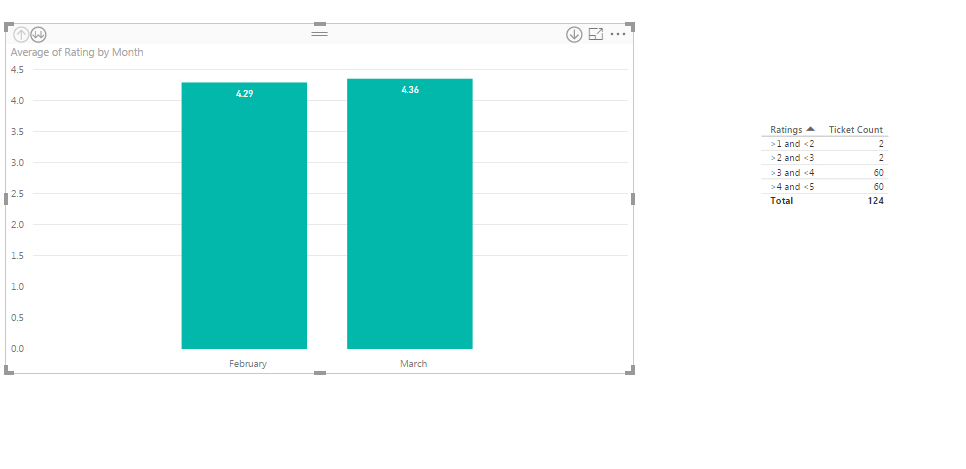
First imageFirst image

When i choose Feburay, right table should display over all tickets based on rating.

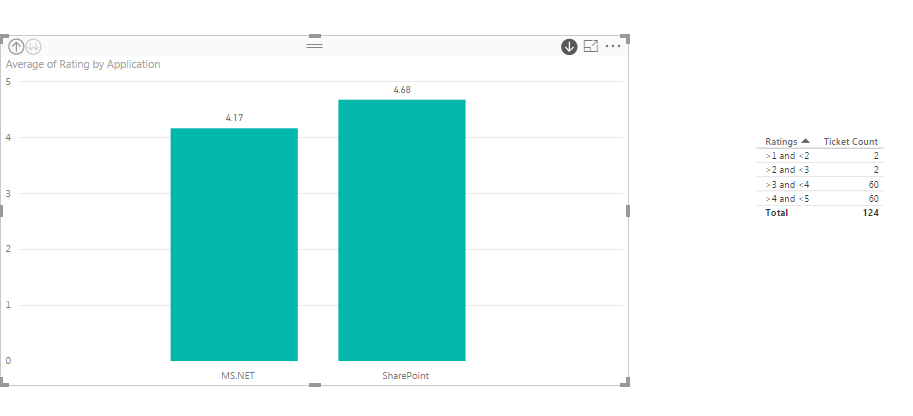
Second ImageSecond Image

When i choose Sharepoint, SharePoint related rating would be displaced at right side table

1 REPLY 1
v-sihou-msft
Microsoft Employee
Microsoft Employee

@lalithakiran


In this scenario, if you want to use drill down method to view data column in your chart , you can create a hierarchy like "Month->Product->Tickets" based on the fact table tp achieve your requirement.


However, it's really not a good practice to put different dimension columns into same hierarchy.


Regards,

Helpful resources

Announcements
New to Fabric survey Carousel

New to Fabric Survey

If you have recently started exploring Fabric, we'd love to hear how it's going. Your feedback can help with product improvements.

Power BI DataViz World Championships carousel

Power BI DataViz World Championships - June 2026

A new Power BI DataViz World Championship is coming this June! Don't miss out on submitting your entry.

Join our Fabric User Panel

Join our Fabric User Panel

Share feedback directly with Fabric product managers, participate in targeted research studies and influence the Fabric roadmap.

March Power BI Update Carousel

Power BI Community Update - March 2026

Check out the March 2026 Power BI update to learn about new features.