Don't miss your chance to take the Fabric Data Engineer (DP-600) exam for FREE! Find out how by attending the DP-600 session on April 23rd (pacific time), live or on-demand.
Learn moreNext up in the FabCon + SQLCon recap series: The roadmap for Microsoft SQL and Maximizing Developer experiences in Fabric. All sessions are available on-demand after the live show. Register now
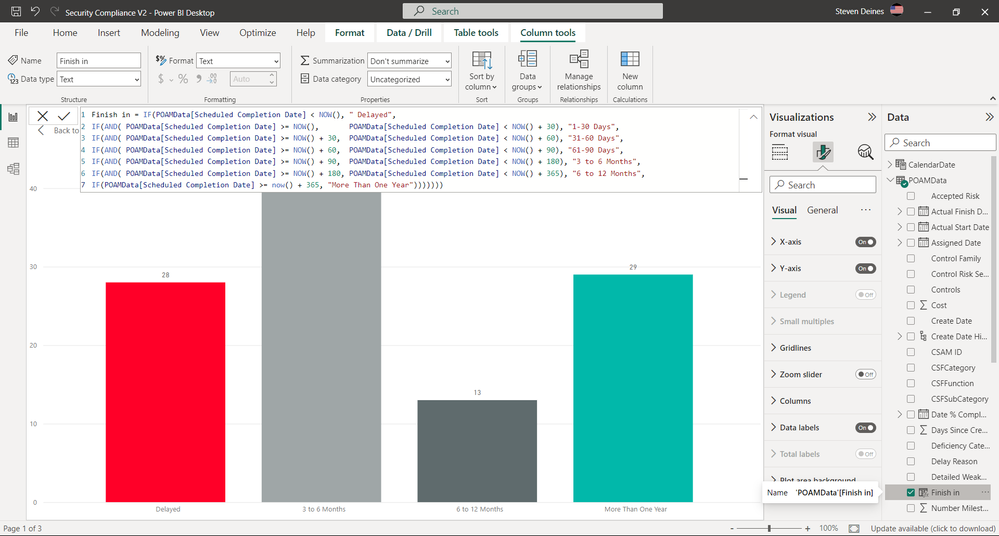
I added the code on lines 2, 3, and 4 in the attached image and selected the Check mark. But how does one update the actual Graphics to show the added lines when using PowerBI?
Solved! Go to Solution.
Hi, @Jousterama
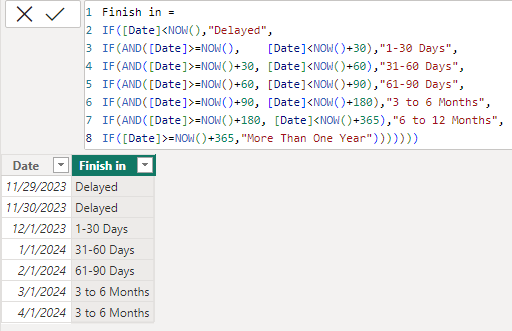
I've simply modelled some data to hopefully fit your situation.
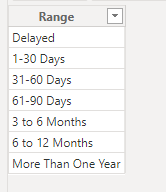
You can try the following methods. Add a new range table.
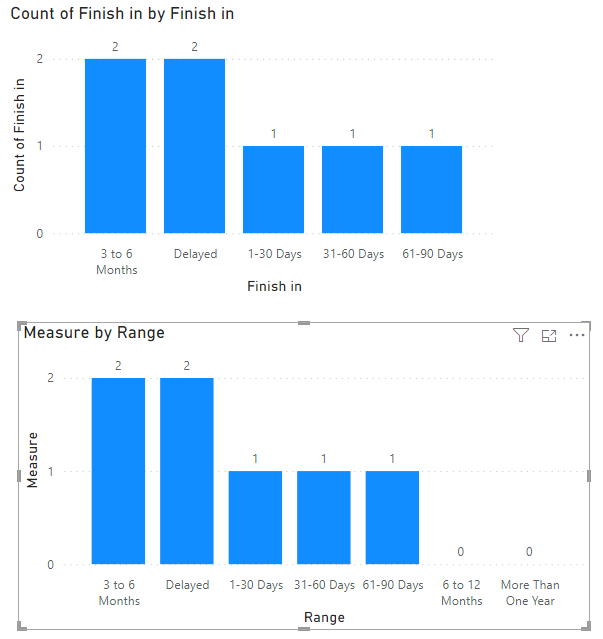
Measure = CALCULATE(COUNT('Table'[Finish in]),FILTER(ALL('Table'),[Finish in]=SELECTEDVALUE(Range[Range])))+0
Is this the result you expect? Please see the attached document.
Best Regards,
Community Support Team _Charlotte
If this post helps, then please consider Accept it as the solution to help the other members find it more quickly.
Hi, @Jousterama
I've simply modelled some data to hopefully fit your situation.
You can try the following methods. Add a new range table.
Measure = CALCULATE(COUNT('Table'[Finish in]),FILTER(ALL('Table'),[Finish in]=SELECTEDVALUE(Range[Range])))+0
Is this the result you expect? Please see the attached document.
Best Regards,
Community Support Team _Charlotte
If this post helps, then please consider Accept it as the solution to help the other members find it more quickly.
The answer - The graphics are not going to show unless there is data in that range.
Second question - How does one show the graph as Zero when there is no data in that range?
Using the option 'Show items with no data' did not provide an update to the graphic, per the attached.
If you have recently started exploring Fabric, we'd love to hear how it's going. Your feedback can help with product improvements.
A new Power BI DataViz World Championship is coming this June! Don't miss out on submitting your entry.
Share feedback directly with Fabric product managers, participate in targeted research studies and influence the Fabric roadmap.
| User | Count |
|---|---|
| 44 | |
| 43 | |
| 38 | |
| 19 | |
| 15 |
| User | Count |
|---|---|
| 68 | |
| 64 | |
| 31 | |
| 29 | |
| 24 |