cancel
Showing results for 
Search instead for 
Did you mean: 

Get Fabric Certified for FREE during Fabric Data Days. Don't miss your chance! Request now

Reply
engyin2
Frequent Visitor

How to tag a measure with a selected category?

Hi, 


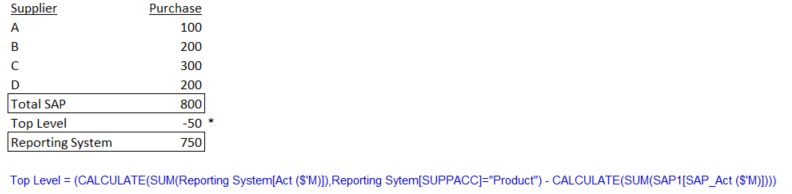
I have details transaction from SAP source but there is top level adjustment done outside SAP system hence the reported number is lower than the SAP total sum.

I have created the below measure to calculate the top level in BI. May I know how to tag the calculated amount with "Other Supplier" so that I can have the reported number by Supplier inc. the top level adj ?  Please help. Thanks.


Capture.PNG

3 REPLIES 3
Floriankx
Solution Sage
Solution Sage

Hello,


you could try and add an additional table to your BI:

Table: Top_N_Group

GroupID
Total SAP1
Other Supplier2


Wraper Top N:=IF(ISFILTERED(Top_N_Group[Group]),
 SWITCH(MAX(Top_N_Group[ID]),
  1,[Total SAP],
  2,[Top Level],
Blank())


Then you create a Pivot with your Group as row your supplier as row below and [Wraper Top N] as value.

Hi, 

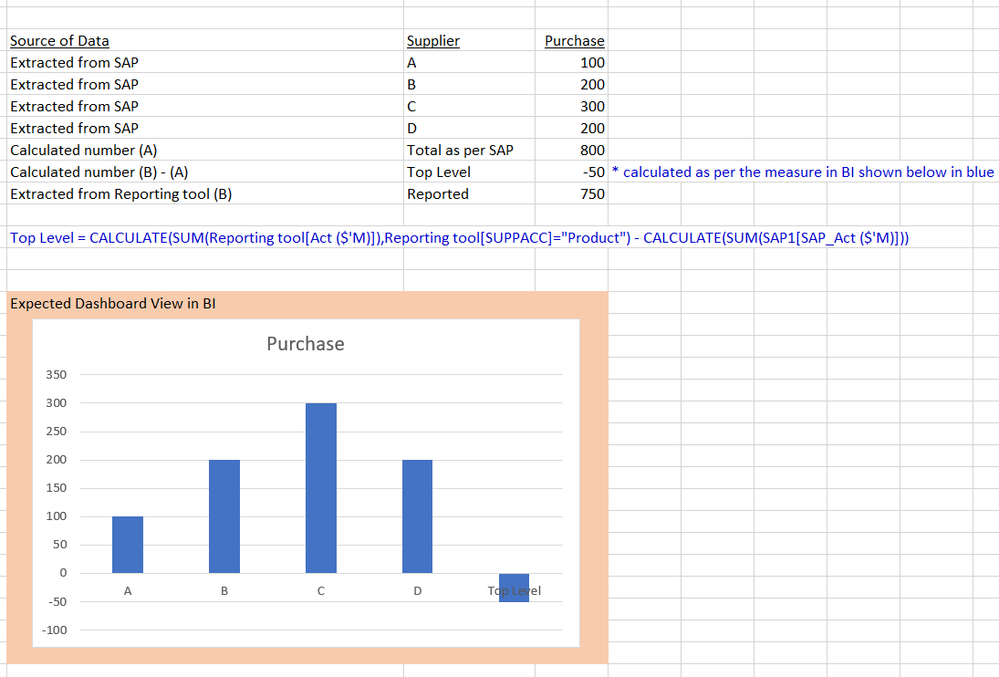
I am trying to have the calculated measured to have vendor categorised as "Other Vendor" but not sure how to write the DAX formula to have it tag.


Below is the visual I would like to have in BI. Thanks.


Capture.PNG

Hi anyone can help?

Helpful resources

Announcements
November Power BI Update Carousel

Power BI Monthly Update - November 2025

Check out the November 2025 Power BI update to learn about new features.

Fabric Data Days Carousel

Fabric Data Days

Advance your Data & AI career with 50 days of live learning, contests, hands-on challenges, study groups & certifications and more!

FabCon Atlanta 2026 carousel

FabCon Atlanta 2026

Join us at FabCon Atlanta, March 16-20, for the ultimate Fabric, Power BI, AI and SQL community-led event. Save $200 with code FABCOMM.

Top Solution Authors
Top Kudoed Authors