cancel
Showing results for 
Search instead for 
Did you mean: 

The Power BI Data Visualization World Championships is back! Get ahead of the game and start preparing now! Learn more

Reply
engyin2
Frequent Visitor

How to tag a measure with a selected category?

Hi, 


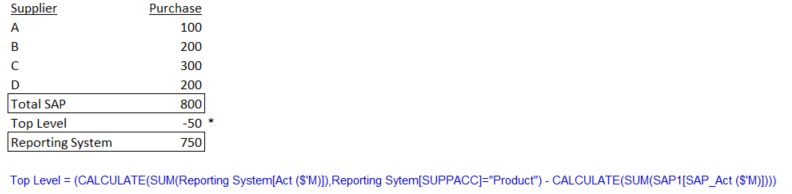
I have details transaction from SAP source but there is top level adjustment done outside SAP system hence the reported number is lower than the SAP total sum.

I have created the below measure to calculate the top level in BI. May I know how to tag the calculated amount with "Other Supplier" so that I can have the reported number by Supplier inc. the top level adj ?  Please help. Thanks.


Capture.PNG

3 REPLIES 3
Floriankx
Solution Sage
Solution Sage

Hello,


you could try and add an additional table to your BI:

Table: Top_N_Group

GroupID
Total SAP1
Other Supplier2


Wraper Top N:=IF(ISFILTERED(Top_N_Group[Group]),
 SWITCH(MAX(Top_N_Group[ID]),
  1,[Total SAP],
  2,[Top Level],
Blank())


Then you create a Pivot with your Group as row your supplier as row below and [Wraper Top N] as value.

Hi, 

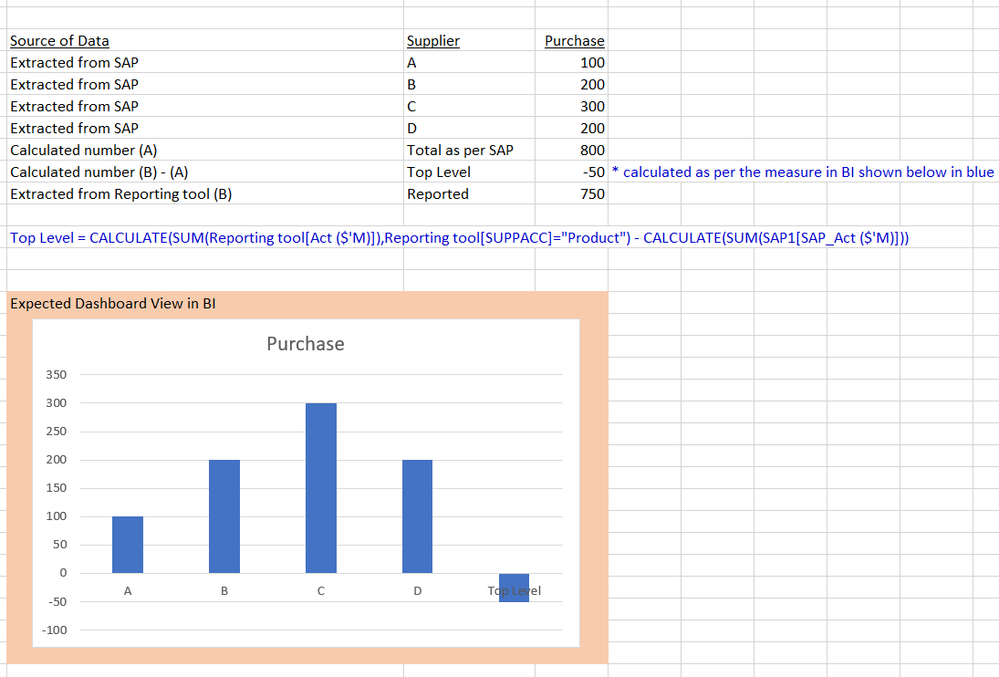
I am trying to have the calculated measured to have vendor categorised as "Other Vendor" but not sure how to write the DAX formula to have it tag.


Below is the visual I would like to have in BI. Thanks.


Capture.PNG

Hi anyone can help?

Helpful resources

Announcements
Power BI DataViz World Championships

Power BI Dataviz World Championships

The Power BI Data Visualization World Championships is back! Get ahead of the game and start preparing now!

November Power BI Update Carousel

Power BI Monthly Update - November 2025

Check out the November 2025 Power BI update to learn about new features.

FabCon Atlanta 2026 carousel

FabCon Atlanta 2026

Join us at FabCon Atlanta, March 16-20, for the ultimate Fabric, Power BI, AI and SQL community-led event. Save $200 with code FABCOMM.