Join us at FabCon Atlanta from March 16 - 20, 2026, for the ultimate Fabric, Power BI, AI and SQL community-led event. Save $200 with code FABCOMM.
Register now!The Power BI Data Visualization World Championships is back! Get ahead of the game and start preparing now! Learn more
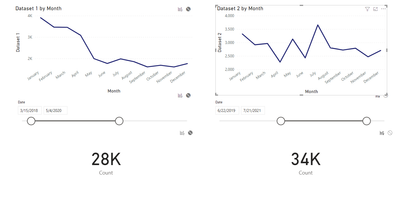
Note that on the left my count shows 28K on the right it shows 34K. Both values on the left and on the right come from the same source. Notice the edit interactions show when i click on the graph in the right it only corresponds to values on the right, same is applied on the left side. I would like to create a measure that would give me the difference between 34k and 28k which would be 6K when shown in a card. Note I would like to have a dynamic measure that would adjust accordingly to date slicer.
Solved! Go to Solution.
@user35131 , You need one independent date table for that
How to use two Date/Period slicers :https://www.youtube.com/watch?v=WSeZr_-MiTg
@user35131 , You need one independent date table for that
How to use two Date/Period slicers :https://www.youtube.com/watch?v=WSeZr_-MiTg
I created a second date table for that it worked. Thank you.
Hello! I also have this difficulty. Could you upload your solution?
The Power BI Data Visualization World Championships is back! Get ahead of the game and start preparing now!
| User | Count |
|---|---|
| 38 | |
| 36 | |
| 33 | |
| 30 | |
| 28 |
| User | Count |
|---|---|
| 128 | |
| 88 | |
| 79 | |
| 67 | |
| 62 |