Get certified for free when you join Fabric Data Days 2026 and dive into Fabric, Power BI, SQL, AI, and other essential data skills.
Join nowTry your skills in the Power BI Dataviz World Championship! Round one ends June 26. Join now
I am using an Azure Analysis Services data source and I have adate table with Month and MonthYear as columns. When I put this in a table, it sorts alphabetically. But there is a different fiscal period table where they are sorting chronologically. I don't know how this was set up in the Tabular model, but is there a way on the Power BI report that I can get the months to sort chronolically in the report without touching the Azure data model on the backend?
Hi @meddojeddo ,
What connection mode are you using to connect to Azure Analysis Services? If it is Import mode, you can refer to the following blogs to sort the dates chronologically.
How to sort months chronologically in Power BI
Power BI: Sorting by Month Chronologically Rather Than Alphabetically
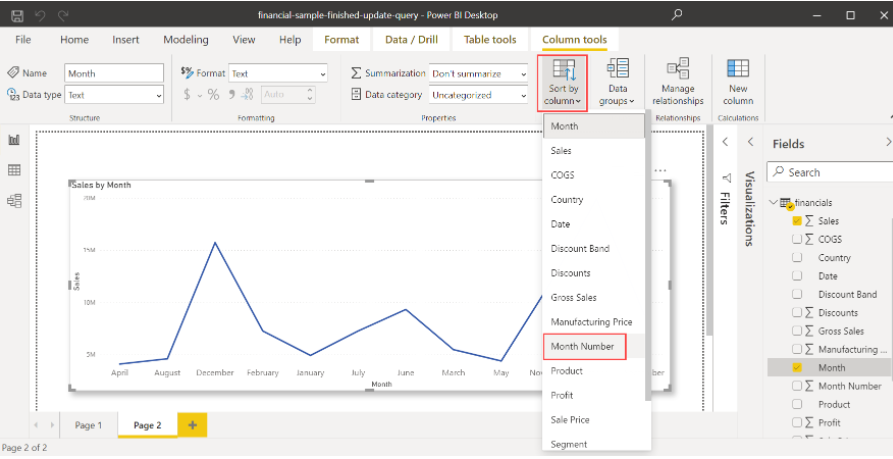
If it is Connect live, if there is a month number column in the date table, use the Sort by column setting to see if you can achieve the correct sorting.
Best Regards
@meddojeddo , Do you have a column like YYYYMM. You can mark that as a sort column for the month year. But I doubt you have to do on AAS.
Don't miss out on Data Days, June 15 through August 7. Learn Fabric, Power BI, SQL, AI and more.
Check out the May 2026 Power BI update to learn about new features.
| User | Count |
|---|---|
| 24 | |
| 22 | |
| 20 | |
| 18 | |
| 13 |
| User | Count |
|---|---|
| 68 | |
| 57 | |
| 42 | |
| 42 | |
| 30 |