Join us at FabCon Atlanta from March 16 - 20, 2026, for the ultimate Fabric, Power BI, AI and SQL community-led event. Save $200 with code FABCOMM.
Register now!The Power BI Data Visualization World Championships is back! Get ahead of the game and start preparing now! Learn more
I am using an Azure Analysis Services data source and I have adate table with Month and MonthYear as columns. When I put this in a table, it sorts alphabetically. But there is a different fiscal period table where they are sorting chronologically. I don't know how this was set up in the Tabular model, but is there a way on the Power BI report that I can get the months to sort chronolically in the report without touching the Azure data model on the backend?
Hi @meddojeddo ,
What connection mode are you using to connect to Azure Analysis Services? If it is Import mode, you can refer to the following blogs to sort the dates chronologically.
How to sort months chronologically in Power BI
Power BI: Sorting by Month Chronologically Rather Than Alphabetically
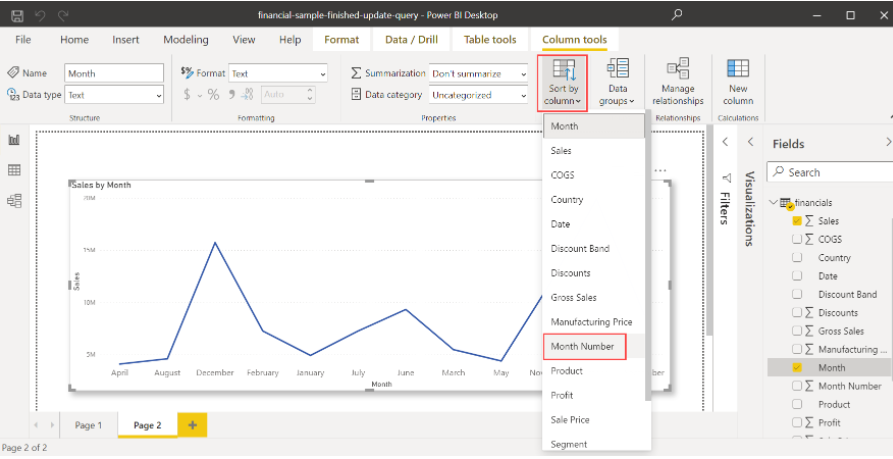
If it is Connect live, if there is a month number column in the date table, use the Sort by column setting to see if you can achieve the correct sorting.
Best Regards
@meddojeddo , Do you have a column like YYYYMM. You can mark that as a sort column for the month year. But I doubt you have to do on AAS.
The Power BI Data Visualization World Championships is back! Get ahead of the game and start preparing now!
| User | Count |
|---|---|
| 39 | |
| 35 | |
| 33 | |
| 32 | |
| 28 |
| User | Count |
|---|---|
| 136 | |
| 96 | |
| 77 | |
| 67 | |
| 65 |