FabCon is coming to Atlanta
Join us at FabCon Atlanta from March 16 - 20, 2026, for the ultimate Fabric, Power BI, AI and SQL community-led event. Save $200 with code FABCOMM.
Register now!- Power BI forums
- Get Help with Power BI
- Desktop
- Service
- Report Server
- Power Query
- Mobile Apps
- Developer
- DAX Commands and Tips
- Custom Visuals Development Discussion
- Health and Life Sciences
- Power BI Spanish forums
- Translated Spanish Desktop
- Training and Consulting
- Instructor Led Training
- Dashboard in a Day for Women, by Women
- Galleries
- Data Stories Gallery
- Themes Gallery
- Contests Gallery
- QuickViz Gallery
- Quick Measures Gallery
- Visual Calculations Gallery
- Notebook Gallery
- Translytical Task Flow Gallery
- TMDL Gallery
- R Script Showcase
- Webinars and Video Gallery
- Ideas
- Custom Visuals Ideas (read-only)
- Issues
- Issues
- Events
- Upcoming Events
The Power BI Data Visualization World Championships is back! Get ahead of the game and start preparing now! Learn more
- Power BI forums
- Forums
- Get Help with Power BI
- Desktop
- Re: How to show the network days between end date ...
- Subscribe to RSS Feed
- Mark Topic as New
- Mark Topic as Read
- Float this Topic for Current User
- Bookmark
- Subscribe
- Printer Friendly Page

- Mark as New
- Bookmark
- Subscribe
- Mute
- Subscribe to RSS Feed
- Permalink
- Report Inappropriate Content
How to show the network days between end date and latest fiscal year
Hi Community,
I have created one measure to find out network days between start date and end date. See below:
| Item Description | FY Year Start for Start | Start | FY Year Start for End | End | Networkdays for Start and End | FYEND for End | NetWorkDays B/W End and Fy End | Terms - Price | Cancelled Revenue |
| + | 4/1/2018 | 11/19/2018 | 4/1/2018 | 1/31/2019 | 44 | 3/31/2019 | 33 | $65 | $17,160 |
| Adam Etman | 4/1/2018 | 7/5/2018 | 4/1/2018 | 1/4/2019 | 106 | 3/31/2019 | 48 | $80 | $30,720 |
| Adashea Simpson-Womack | 4/1/2016 | 10/4/2016 | 4/1/2018 | 2/6/2019 | 490 | 3/31/2019 | 30 | $22 | $5,280 |
| Aditya Malhotra | 4/1/2018 | 2/5/2019 | 4/1/2019 | 4/22/2019 | 44 | 3/31/2020 | 198 | $50 | $79,200 |
| Alan Woo | 4/1/2011 | 1/23/2012 | 4/1/2018 | 1/7/2019 | 1453 | 3/31/2019 | 48 | $79 | $30,336 |
| Alejandro G Villegas | 4/1/2017 | 5/1/2017 | 4/1/2018 | 2/1/2019 | 369 | 3/31/2019 | 32 | $88 | $22,528 |
| Alexander Gallo | 4/1/2018 | 11/19/2018 | 4/1/2018 | 1/11/2019 | 33 | 3/31/2019 | 44 | $50 | $17,600 |
| Alexandra Garret | 4/1/2018 | 5/14/2018 | 4/1/2019 | 5/24/2019 | 217 | 3/31/2020 | 178 | $50 | $71,200 |
| Ali Khomusi | 4/1/2018 | 6/18/2018 | 4/1/2019 | 6/4/2019 | 202 | 3/31/2020 | 173 | $79 | $109,336 |
| Alina Collins | 4/1/2018 | 6/25/2018 | 4/1/2018 | 2/5/2019 | 130 | 3/31/2019 | 31 | $85 | $21,080 |
| Alok Tandon | 4/1/2014 | 11/3/2014 | 4/1/2018 | 2/28/2019 | 904 | 3/31/2019 | 17 | $60 | $8,160 |
| Alton Harmon | 4/1/2017 | 12/5/2017 | 4/1/2019 | 6/7/2019 | 316 | 3/31/2020 | 170 | $55 | $74,800 |
Solved! Go to Solution.


- Mark as New
- Bookmark
- Subscribe
- Mute
- Subscribe to RSS Feed
- Permalink
- Report Inappropriate Content
Network Days, Both =
VAR start_ = SELECTEDVALUE('Query1'[Start])
VAR FY_ = SELECTEDVALUE('Query1'[FY Year Start for End])
VAR Calendar1 = CALENDAR(MIN('Query1'[FY Year Start for End]),MAX('Query1'[End Date]))
VAR Calendar2 = ADDCOLUMNS(Calendar1,"WeekDay",WEEKDAY([Date],2))
VAR Calendar3 = CALENDAR(MIN('Query1'[Start ]),MAX('Query1'[End Date]))
VAR Calendar4 = ADDCOLUMNS(Calendar3,"WeekDay",WEEKDAY([Date],2))
RETURN
IF(start_>FY_ ,
COUNTX(FILTER(Calendar4,[WeekDay]<=5),[Date]) ,
COUNTX(FILTER(Calendar2,[WeekDay]<=5),[Date]))
Connect on LinkedIn
- Mark as New
- Bookmark
- Subscribe
- Mute
- Subscribe to RSS Feed
- Permalink
- Report Inappropriate Content
Hi Community people,
Please help me out from this which i posted in below link and i elobarated with example in reply..
Hi @tex628 Please have look for this
Thanks in advance
B V S Sudhakar
- Mark as New
- Bookmark
- Subscribe
- Mute
- Subscribe to RSS Feed
- Permalink
- Report Inappropriate Content
Hello,
Any Suggestions...
Is it possible
Thanks & Regards,
B V S Sudhakar
- Mark as New
- Bookmark
- Subscribe
- Mute
- Subscribe to RSS Feed
- Permalink
- Report Inappropriate Content
I tried to create network days between (FY Year Start for End) and (end)
But some values are not coming properly
Ex: 1st in the data
| Start | FY Year Start for End | End Date | Networkdays for Start and End |
| 11/19/2018 | 4/1/2018 | 1/31/2019 | 44 |
But If i try to find network days between (FY Year Start for End) and (end) it is giving apprx.175 it's wrong
One more is
| Start | FY Year Start for End | End Date | Networkdays for Start and End |
| 1/23/2012 | 4/1/2018 | 1/7/2019 | 1453 |
If i try to find network days between (FY Year Start for End) and (end) it is giving apprx.165 it's correct
I am not able create proper measure
Please help me out from this
Thanks in advance
B V S Sudhakar
- Mark as New
- Bookmark
- Subscribe
- Mute
- Subscribe to RSS Feed
- Permalink
- Report Inappropriate Content
Hello @Anonymous,
In your calculation,
Network Days =
VAR Calendar1 = CALENDAR(MIN('Query1'[Start]),MAX('Query1'[End]))
VAR Calendar2 = ADDCOLUMNS(Calendar1,"WeekDay",WEEKDAY([Date],2))
RETURN COUNTX(FILTER(Calendar2,[WeekDay]<=6),[Date]) - COUNTX(FILTER(Calendar2,[WeekDay]>=6),[Date])
I'm assuming that what you are aiming for is calculating the difference in workdays between [FY Year Start for End] and [End Date]. This would mean that you count the total amount of days and exclude sundays & saturdays. From what i can see you need to change the <=6 to a <=5 as you are counting sundays twice!
But whats confusing me is that you're saying that 175 is the correct number of days between the 4/1/2018 - 1/7/2019 ... Did i miss something maybe?
Connect on LinkedIn
- Mark as New
- Bookmark
- Subscribe
- Mute
- Subscribe to RSS Feed
- Permalink
- Report Inappropriate Content
Hi @tex628 ,
I said approx. value.. and i changed in my measure. It's giving proper value for same fiscal year of start and end.
i.e.
| Start | FY Year Start for End | End Date | Networkdays for Start and End |
| 11/19/2018 | 4/1/2018 | 1/31/2019 | 34 |
It's correct but at the same time i need to show
network days between (FY Year Start for End) and (End)
| Start | FY Year Start for End | End Date | Networkdays for Start and End |
| 1/23/2012 | 4/1/2018 | 1/7/2019 | 1453 |
Can you please help me for this also
Thank you in advance
- Mark as New
- Bookmark
- Subscribe
- Mute
- Subscribe to RSS Feed
- Permalink
- Report Inappropriate Content
I'm not entirely sure that i understand you totally, im sorry!
But going to try and simplify this as much as possible.
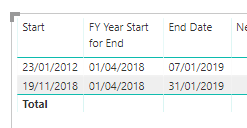
Here are your examples:
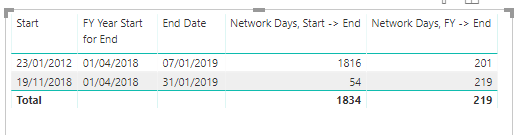
I used your measure to make 2 new ones:
Network Days, Start -> End =
VAR Calendar1 = CALENDAR(MIN(Table3[Start ]),MAX(Table3[End Date]))
VAR Calendar2 = ADDCOLUMNS(Calendar1,"WeekDay",WEEKDAY([Date],2))
RETURN COUNTX(FILTER(Calendar2,[WeekDay]<=5),[Date])
Network Days, FY -> End =
VAR Calendar1 = CALENDAR(MIN(Table3[FY Year Start for End]),MAX(Table3[End Date]))
VAR Calendar2 = ADDCOLUMNS(Calendar1,"WeekDay",WEEKDAY([Date],2))
RETURN COUNTX(FILTER(Calendar2,[WeekDay]<=5),[Date])
Which gave me this result:
Does the numbers in tehse two measures appear to be correct?
/J
Connect on LinkedIn
- Mark as New
- Bookmark
- Subscribe
- Mute
- Subscribe to RSS Feed
- Permalink
- Report Inappropriate Content
Hi @tex628 ,
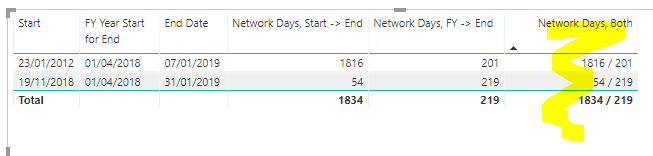
But I want to show those two correct values in one column only means i need to show 201 and 54 in one column
Can you please give some suggetion / Solution
Thank you in advance
- Mark as New
- Bookmark
- Subscribe
- Mute
- Subscribe to RSS Feed
- Permalink
- Report Inappropriate Content
- Mark as New
- Bookmark
- Subscribe
- Mute
- Subscribe to RSS Feed
- Permalink
- Report Inappropriate Content
- Mark as New
- Bookmark
- Subscribe
- Mute
- Subscribe to RSS Feed
- Permalink
- Report Inappropriate Content
Network Days, Both =
VAR start_ = SELECTEDVALUE('Query1'[Start])
VAR FY_ = SELECTEDVALUE('Query1'[FY Year Start for End])
VAR Calendar1 = CALENDAR(MIN('Query1'[FY Year Start for End]),MAX('Query1'[End Date]))
VAR Calendar2 = ADDCOLUMNS(Calendar1,"WeekDay",WEEKDAY([Date],2))
VAR Calendar3 = CALENDAR(MIN('Query1'[Start ]),MAX('Query1'[End Date]))
VAR Calendar4 = ADDCOLUMNS(Calendar3,"WeekDay",WEEKDAY([Date],2))
RETURN
IF(start_>FY_ ,
COUNTX(FILTER(Calendar4,[WeekDay]<=5),[Date]) ,
COUNTX(FILTER(Calendar2,[WeekDay]<=5),[Date]))
Connect on LinkedIn
- Mark as New
- Bookmark
- Subscribe
- Mute
- Subscribe to RSS Feed
- Permalink
- Report Inappropriate Content
- Mark as New
- Bookmark
- Subscribe
- Mute
- Subscribe to RSS Feed
- Permalink
- Report Inappropriate Content
Helpful resources

Power BI Dataviz World Championships
The Power BI Data Visualization World Championships is back! Get ahead of the game and start preparing now!

Power BI Monthly Update - December 2025
Check out the December 2025 Power BI Holiday Recap!

FabCon Atlanta 2026
Join us at FabCon Atlanta, March 16-20, for the ultimate Fabric, Power BI, AI and SQL community-led event. Save $200 with code FABCOMM.

| User | Count |
|---|---|
| 39 | |
| 38 | |
| 38 | |
| 28 | |
| 27 |


| User | Count |
|---|---|
| 124 | |
| 88 | |
| 73 | |
| 66 | |
| 65 |


