Join us at FabCon Atlanta from March 16 - 20, 2026, for the ultimate Fabric, Power BI, AI and SQL community-led event. Save $200 with code FABCOMM.
Register now!Get Fabric Certified for FREE during Fabric Data Days. Don't miss your chance! Request now
| key | User | Manager | BI | CD | Tool | PO | DB | Trarining Complete |
| 1 | Alex | Shane | Y | Y | Y | Y | Y | Y |
| 2 | Angela | Shane | Y | Y | Y | Y | Y | Y |
| 3 | Andrew | Shane | Y | Y | Y | Y | N | N |
| 4 | Jamie | Chris | Y | Y | Y | N | Y | N |
| 5 | Joseph | Chris | N | N | N | N | N | N |
| 6 | Smith | Katherine | Y - PASS | Y | Y - PASS | Y | Y | Y |
| 7 | Bravo | Katherine | Y | Y | Y | Y | Y | Y |
| 8 | Dean | Lee | Y | Y | Y | Y | Y | Y |
| 9 | John | Lee | Y | Y | Y | Y | Y | Y |
| 10 | William | Lee | Y | Y | Y | Y | N | N |
Training Complete Excel formula= =IF(COUNTIF(D2:H2,"")>0,"N",IF(COUNTIF(D2:H2,"N")>0,"N","Y")) for all the rows in Training Complete.
Problem: I like to show in PowerBI the status of the training completion by user name, report should show completion status of training complete and overall % complete. I like to filter on the Manager
Thanks in advance team.
Solved! Go to Solution.
Hi,
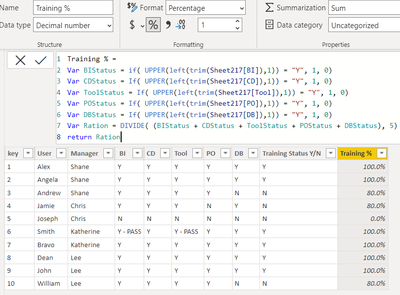
You could create the calculated columns as below :
- for Training Status :
- For Training Passing Ratio :
Thanks for Kudos,
Please mark it as solution if it helps
Thanks,
like to understand a bit more about the UPPER(left(trim(sheet217[BI], as BI I can understand it the the table but the rest of the query..
SHEET217 ? Is a bit confusing
Hi @DavidGM ,
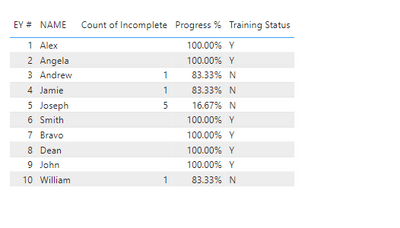
For this, I would unpivot the data first before making any calculations. Once unpivoted, I can then count the number of N per user and then use the count in calculating for the percentage of completion.
Here are the measures I'd use:
Count of Incomplete =
CALCULATE (
COUNTROWS ( 'Table' ),
FILTER ( ALLEXCEPT ( 'Table', 'Table'[EY #] ), 'Table'[Value] = "N" )
)
Progress % =
1 - DIVIDE ( [Count of Incomplete], 6 )
Training Status =
IF ( [Count of Incomplete] = BLANK (), "Y", "N" )
Sample result:
Please see attached pbix for the details.
It worked well for me! Thanks
Check out the November 2025 Power BI update to learn about new features.
Advance your Data & AI career with 50 days of live learning, contests, hands-on challenges, study groups & certifications and more!