
Join us at FabCon Atlanta from March 16 - 20, 2026, for the ultimate Fabric, Power BI, AI and SQL community-led event. Save $200 with code FABCOMM.
Register now!Vote for your favorite vizzies from the Power BI Dataviz World Championship submissions. Vote now!
I have 4 files in a folder. Not when i am combining those files and expanding them, date creation column is not coming up?
in simple words, how to show file creation date in power bi as column?
Solved! Go to Solution.
Hi @Anonymous,
In Power BI desktop Query Editor, after we retrieve files in SharePoint online folder, the [Date created] column displays as before before using Combine Files feature.
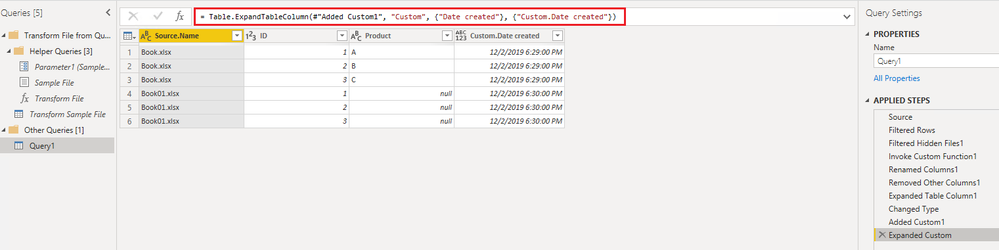
After we use Combine Files feature, the table shows like below:
To add a column returns [Date created] column values for each file, we can do it like below:
Best Regards,
Qiuyun Yu
In the meantime, I think, I have found a way around the problem:
When you combine Sharepoint files, Power BI automatically created "Removed Other Columns" step, which makes it only leave the Source Name. If you add "Date created" there, it's going to leave it too.
It is fast and also works if you have file with identical names (say, in different folders).
You are a legend!
This is a much better solution. Simple and fast
Hi @Anonymous,
In Power BI desktop Query Editor, after we retrieve files in SharePoint online folder, the [Date created] column displays as before before using Combine Files feature.
After we use Combine Files feature, the table shows like below:
To add a column returns [Date created] column values for each file, we can do it like below:
Best Regards,
Qiuyun Yu
Thanks for the solution!
Although, when I tried it, it made things really slow, subsequent grouping that I needed to perform took several hours...
Is there a way to aviod that? My data is not that big, just about 80 files....
If you love stickers, then you will definitely want to check out our Community Sticker Challenge!
Check out the January 2026 Power BI update to learn about new features.
| User | Count |
|---|---|
| 58 | |
| 57 | |
| 42 | |
| 17 | |
| 17 |
| User | Count |
|---|---|
| 113 | |
| 108 | |
| 38 | |
| 35 | |
| 26 |