cancel
Showing results for 
Search instead for 
Did you mean: 

Try your skills in the Power BI Dataviz World Championship! Round one ends June 26. Join now

Reply
Kyiyer
New Member

How to show sales for current and previous quarters with change in a tile?

Hi

Managed to publish a simple dashboard to PowerBI in about two hours. Awesome tool.

Is it possible to show this quarter's sales and the same quarter's sale from last year with a change percentage field as well? An arrow like stock price would be really nice.

My data comes from an Excel file that has the figures.

Is this information enough?

Many thanks

Iyer
1 ACCEPTED SOLUTION
v-caliao-msft
Microsoft Employee
Microsoft Employee

@Kyiyer

Yes, I think this is possible. We could take use of the Combo Chart to compare this year sales and last year sales, also the change percentage:Tutorial: Combo Chart in Power BI


For example, assuming here we have two tables, one for the sales (sales_USD), and another for the time table (DateTime). Sales table contains the sales and the corresponding sales’ date; the date table is a special table built to help calculate.
we could create two measures for the SUM of sales of this quarter and the same quarter last year, another measure to calculate their changes.
This year sales:
[ThisQsales] := CALCULATE(
                                        SUM(Sales_USD[SalesAmount_USD]),
                                                  DATESQTD(DateTime[Date])
                                     )
Last year sales:
[LastyQsales] := CALCULATE(
                                        SUM(Sales_USD[SalesAmount_USD]),
                                                  DATESQTD(
                                                      SAMEPERIODLASTYEAR(DateTime[Date])
                                                     )
                                     )

The change measure:
[Changes] := DIVIDE(
                       [ThisQsales] -  [LastyQsales],
                       [LastyQsales]
                       )

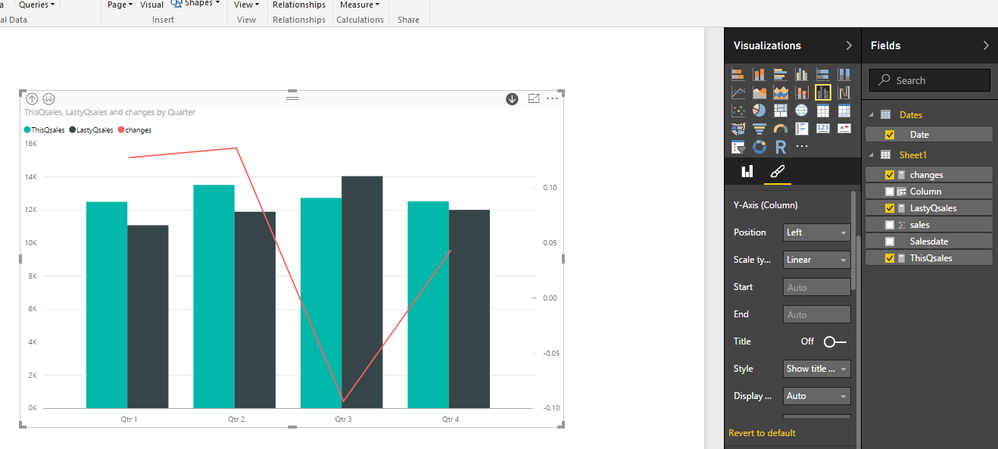
Once created, put the [LastyQsales] and [ThisQsales] into column values, put the [changes] into line values.

See my example:
Capture.PNG


Regarding more information about data modeling, please check:Modeling


If you have any further questions, please feel free to ask.


Regards,

Charlie Liao

View solution in original post

3 REPLIES 3
v-caliao-msft
Microsoft Employee
Microsoft Employee

@Kyiyer

Yes, I think this is possible. We could take use of the Combo Chart to compare this year sales and last year sales, also the change percentage:Tutorial: Combo Chart in Power BI


For example, assuming here we have two tables, one for the sales (sales_USD), and another for the time table (DateTime). Sales table contains the sales and the corresponding sales’ date; the date table is a special table built to help calculate.
we could create two measures for the SUM of sales of this quarter and the same quarter last year, another measure to calculate their changes.
This year sales:
[ThisQsales] := CALCULATE(
                                        SUM(Sales_USD[SalesAmount_USD]),
                                                  DATESQTD(DateTime[Date])
                                     )
Last year sales:
[LastyQsales] := CALCULATE(
                                        SUM(Sales_USD[SalesAmount_USD]),
                                                  DATESQTD(
                                                      SAMEPERIODLASTYEAR(DateTime[Date])
                                                     )
                                     )

The change measure:
[Changes] := DIVIDE(
                       [ThisQsales] -  [LastyQsales],
                       [LastyQsales]
                       )

Once created, put the [LastyQsales] and [ThisQsales] into column values, put the [changes] into line values.

See my example:
Capture.PNG


Regarding more information about data modeling, please check:Modeling


If you have any further questions, please feel free to ask.


Regards,

Charlie Liao

Hi Charlie,


I wish to achieve something similar as what Kyiyer did, therefore, I tried your formulas.  However, I only got no data at all.  Then I made the following change by replacing DATESMTD(DateTime[Date]) with Sales_USD[Date].  Unfortunately, it only showed the sales of August.


[ThisMsales] := CALCULATE(SUM(Sales_USD[SalesAmount_USD]), DATESMTD(Sales_USD[[Date]))


Same as [LastyMsales] := CALCULATE(SUM(Sales_USD[SalesAmount_USD]), DATESMTD(SAMEPERIODLASTYEAR(Sales_USD[Date])))  


[Changes] := DIVIDE( [ThisMsales] -  [LastyMsales], [LastyMsales])


Any idea what I might have done wrong?  Thanks in advance.


Jane

@janez599did you manage to resolve this issue? As I have a similar issue in that it keeps returning a blank result.


many thanks

Victoria

Helpful resources

Announcements
Fabric Data Days is here Carousel

Fabric Data Days 2026

Don't miss out on Data Days, June 15 through August 7. Learn Fabric, Power BI, SQL, AI and more.

May Power BI Update Carousel

Power BI Monthly Update - May 2026

Check out the May 2026 Power BI update to learn about new features.

Power BI DataViz World Championships carousel

Power BI DataViz World Championships - June 2026

A new Power BI DataViz World Championship is coming this June! Don't miss out on submitting your entry.