cancel
Showing results for 
Search instead for 
Did you mean: 

The Power BI Data Visualization World Championships is back! Get ahead of the game and start preparing now! Learn more

Reply
Anonymous
Not applicable

How to show only recent date top customer list.

Hi Power BI Gurus,


Literally my second day of Power BI,  just love it! 


Now I am trying to create a Table that will only show the top past due customer in the most recent Report Date without using a filter.    For now, the below table actually shows the top 10 cusomter with the sum amount in all periods.   (see below)


The relative date filtering does not work in my case, since  sometmes the report is updated monthly, and sometimes would be weekly. ( then I could not just simply select the show "in the last 30days")   


I looked at some posts in the community mentioned about using MAX formular, along with Calculate and Filter.... but I am really new, and don't understand the formula well...  Could some please help and advise what to do my this particualr case?   


Any help is well appericated!


Thanks,

Flora


   Recent Date.JPGRECENT DATE 2.JPG

1 ACCEPTED SOLUTION
v-yulgu-msft
Microsoft Employee
Microsoft Employee

Hi @Anonymous,


You want the filter setting which is highlighted with blue circle in above image to be changed automatically, right? I'm afraid this is not possible.


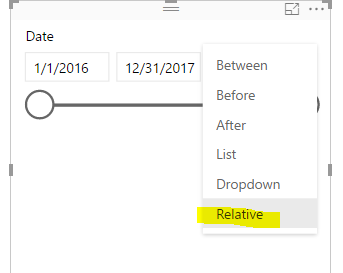
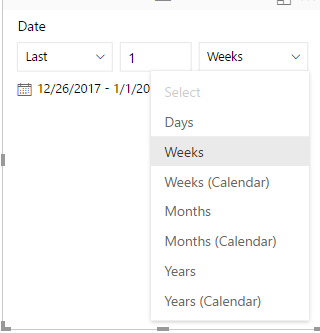
As a workaround, you could add a date slicer. Change the slicer to "relative" so that users can switch between last one week and last one month conditionally depend on their needs.

1.PNG2.PNG


Best regards,

Yuliana Gu

Community Support Team _ Yuliana Gu
If this post helps, then please consider Accept it as the solution to help the other members find it more quickly.

View solution in original post

3 REPLIES 3
v-yulgu-msft
Microsoft Employee
Microsoft Employee

Hi @Anonymous,


You want the filter setting which is highlighted with blue circle in above image to be changed automatically, right? I'm afraid this is not possible.


As a workaround, you could add a date slicer. Change the slicer to "relative" so that users can switch between last one week and last one month conditionally depend on their needs.

1.PNG2.PNG


Best regards,

Yuliana Gu

Community Support Team _ Yuliana Gu
If this post helps, then please consider Accept it as the solution to help the other members find it more quickly.
parry2k
Super User
Super User

You are looking for top 10 customer in last 30 days, correct?


Subscribe to the @PowerBIHowTo YT channel for an upcoming video on List and Record functions in Power Query!!

Learn Power BI and Fabric - subscribe to our YT channel - Click here: @PowerBIHowTo

If my solution proved useful, I'd be delighted to receive Kudos. When you put effort into asking a question, it's equally thoughtful to acknowledge and give Kudos to the individual who helped you solve the problem. It's a small gesture that shows appreciation and encouragement! ❤


Did I answer your question? Mark my post as a solution. Proud to be a Super User! Appreciate your Kudos 🙂
Feel free to email me with any of your BI needs.

Anonymous
Not applicable

Hi,  I am looking the top customer in the most recent report date that is avaialble ( sometime it will be within 30 days - monthly update, sometime it will be within 7 days- weekly update)  -


Thank you~

Helpful resources

Announcements
Power BI DataViz World Championships

Power BI Dataviz World Championships

The Power BI Data Visualization World Championships is back! Get ahead of the game and start preparing now!

November Power BI Update Carousel

Power BI Monthly Update - November 2025

Check out the November 2025 Power BI update to learn about new features.

FabCon Atlanta 2026 carousel

FabCon Atlanta 2026

Join us at FabCon Atlanta, March 16-20, for the ultimate Fabric, Power BI, AI and SQL community-led event. Save $200 with code FABCOMM.