Join us at FabCon Atlanta from March 16 - 20, 2026, for the ultimate Fabric, Power BI, AI and SQL community-led event. Save $200 with code FABCOMM.
Register now!View all the Fabric Data Days sessions on demand. View schedule
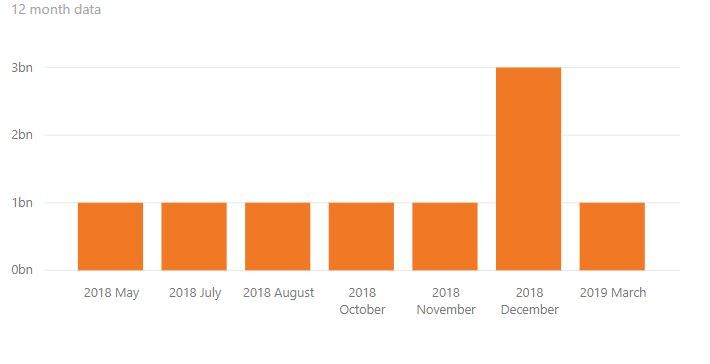
Please suggest how to get missing month in this chart. This is 12 month data, but if there is no data power bi not showing month for that.
Solved! Go to Solution.
You may try to create a measure with IF Fuction like below:
Measure =
IF (
MAX ( 'Table'[date] ) <= DATE ( 2019, 3, 31 )
&& MAX ( 'Table'[date] ) >= DATE ( 2018, 4, 30 ),
SUM ( 'Table'[Amount] ) + 0
)
Regards,
You may try to create a measure with IF Fuction like below:
Measure =
IF (
MAX ( 'Table'[date] ) <= DATE ( 2019, 3, 31 )
&& MAX ( 'Table'[date] ) >= DATE ( 2018, 4, 30 ),
SUM ( 'Table'[Amount] ) + 0
)
Regards,
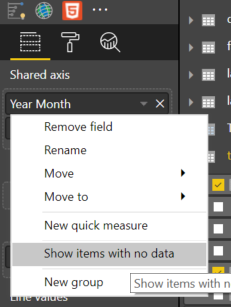
In the Visualisation Pane right click on your filed (Year Month) and select Show items with no data as below.
Hope this helps
Mariusz
By this feature it is showing all 2018 and 2019 months in X-axis. I want to start X-axis from Apr 2018 and last month will be Mar-19.
Check out the November 2025 Power BI update to learn about new features.
Advance your Data & AI career with 50 days of live learning, contests, hands-on challenges, study groups & certifications and more!