cancel
Showing results for 
Search instead for 
Did you mean: 

The Power BI Data Visualization World Championships is back! Get ahead of the game and start preparing now! Learn more

Reply
SRobbo1990
Frequent Visitor

How to show 'Vs Target %' for the month based on Today

Hi all,


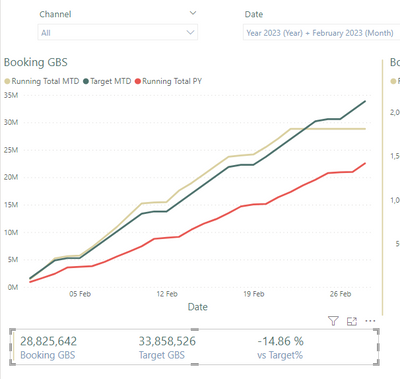
Currently I have a graph showing how the business is doing for the Month vs the Target for the month and the Year previous. Below this we have a Card showing the high level values. (See below)


SRobbo1990_0-1677146913968.png


Now the issue I'm having is that the Booking GBS figure is live in the sense that its up to today. The target obviously goes right up until month end. The 'Vs Target %' is taking the Bookings GBS figure and comparing it to the Target GBS figure at month end. What I've been asked to do is show the 'To date' figures and then compare them.

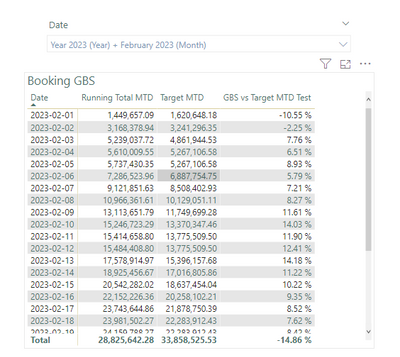
I've been able to create a measure that shows it on a daily basis;

SRobbo1990_1-1677147106067.png

But as soon as I put it on the card it reverts back to the -14.86% figure for the full month. 

Is there anyway I can get it to look at just today's 'Vs Target %' without moving away from using the MTD functions?


Thanks


1 REPLY 1
MAwwad
Solution Sage
Solution Sage


Yes, you can create a measure that calculates the "Vs Target %" for the current day. Here's an example formula that you can use:


scssCopy code
Vs Target % (MTD) Today = VAR TodayDate = TODAY() VAR BookingsMTD = [Bookings GBS MTD] VAR TargetMTD = [Target GBS MTD] VAR TargetToDate = TargetMTD / DAY(TodayDate) * DAY(EOMONTH(TodayDate)) RETURN DIVIDE(BookingsMTD, TargetToDate) - 1
 

This formula uses the TODAY() function to get the current date, and then calculates the target figure for the current day based on the number of days in the month so far. The rest of the calculation is similar to the MTD calculation that you already have.

Once you have this measure, you can add it to the card visual alongside the other measures. It should show the "Vs Target %" for the current day rather than for the entire month.

Helpful resources

Announcements
Power BI DataViz World Championships

Power BI Dataviz World Championships

The Power BI Data Visualization World Championships is back! Get ahead of the game and start preparing now!

November Power BI Update Carousel

Power BI Monthly Update - November 2025

Check out the November 2025 Power BI update to learn about new features.

FabCon Atlanta 2026 carousel

FabCon Atlanta 2026

Join us at FabCon Atlanta, March 16-20, for the ultimate Fabric, Power BI, AI and SQL community-led event. Save $200 with code FABCOMM.