Join us at FabCon Atlanta from March 16 - 20, 2026, for the ultimate Fabric, Power BI, AI and SQL community-led event. Save $200 with code FABCOMM.
Register now!The Power BI Data Visualization World Championships is back! Get ahead of the game and start preparing now! Learn more
Hi everyone,
My excel spreadsheet includes a column Fiscal Period in the form of "Q1-2015", "Q2-2015" ETC UP TO Q4-FY17.
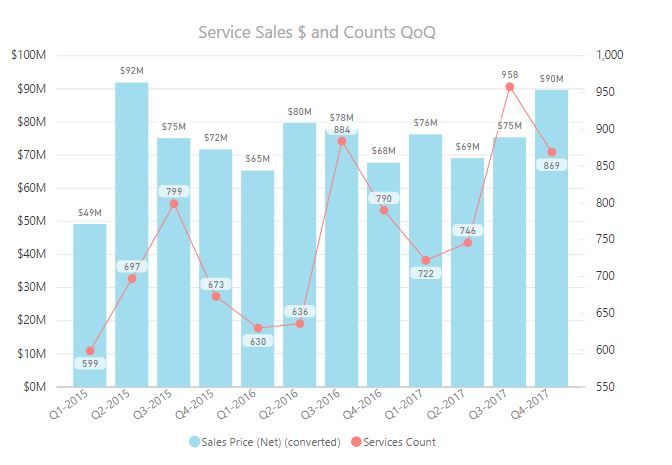
I have created the following viz and I'd like to add a card which somehow will highlight the QoQ growth, from Q3-FY17 to Q4-FY17
Would that be possible?
Solved! Go to Solution.
Hi @harrinho,
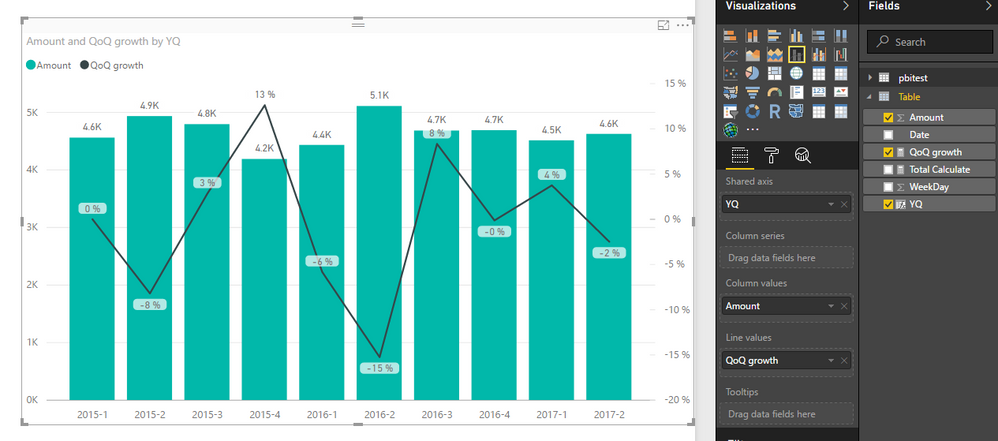
You can try to use below formula to calculate the QoQ growth, but I don't think it is possible to use card visual to highlight growth volume:
QoQ growth =
var current_Date=MAX('Table'[Date])
var previous_Date=DATE(YEAR(current_Date),MONTH(current_Date)-3,1)
var curr=SUMX(FILTER(ALLSELECTED('Table'),FORMAT([Date],"yyyy-q")=FORMAT(current_Date,"yyyy-q")),[Amount])
var prev=SUMX(FILTER(ALLSELECTED('Table'),FORMAT([Date],"yyyy-q")=FORMAT(previous_Date,"yyyy-q")),[Amount])
return
if(prev<>0,DIVIDE(prev-curr,prev),0)
Regards,
Xiaoxin Sheng
Hi @harrinho,
You can try to use below formula to calculate the QoQ growth, but I don't think it is possible to use card visual to highlight growth volume:
QoQ growth =
var current_Date=MAX('Table'[Date])
var previous_Date=DATE(YEAR(current_Date),MONTH(current_Date)-3,1)
var curr=SUMX(FILTER(ALLSELECTED('Table'),FORMAT([Date],"yyyy-q")=FORMAT(current_Date,"yyyy-q")),[Amount])
var prev=SUMX(FILTER(ALLSELECTED('Table'),FORMAT([Date],"yyyy-q")=FORMAT(previous_Date,"yyyy-q")),[Amount])
return
if(prev<>0,DIVIDE(prev-curr,prev),0)
Regards,
Xiaoxin Sheng
The Power BI Data Visualization World Championships is back! Get ahead of the game and start preparing now!
| User | Count |
|---|---|
| 39 | |
| 38 | |
| 38 | |
| 28 | |
| 27 |
| User | Count |
|---|---|
| 124 | |
| 88 | |
| 73 | |
| 66 | |
| 65 |