This time we’re going bigger than ever. Fabric, Power BI, SQL, AI and more. We're covering it all. You won't want to miss it.
Learn moreGet Fabric Certified for FREE during AI Skills Fest. This week only. Secure your voucher now.
Hello,
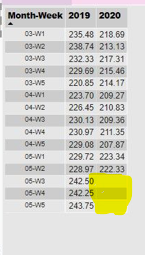
I have a below chart
I would like to show the Forecast(predicted) values for 2020 for the upcoming weeks(example 05-W3, 05-W4, 05-W5 and so on).
I would like to show the predicted (AVG_RAW_CONS_MGD)value, the Raw variance% for 2020 based on the values of previous years(2017, 2018, 2019).
When I click on Analytics tab in Visualization pane to display Forecast values, It is showing me as "Analytics features aren't available for this visual".
Please let me know if there is any way to do this.
Thank you!
Regards,
Aswini
Hi @Anonymous ,
There's no data in your table about 05-w3,w4,w5 in 2020, as you see below:
if the data shown in the pic is from your data source not from a calculated column,you can create a column like:
_2020=IF(ISBLANK('Table[2020]),CALCULATE('Table[2020],DATEADD('Table'[date],-1,year),'Table'[2020])
Hi @v-kelly-msft ,
Thank you for your response!
Below is the some of the Source data. My week Column Starts from 2016-01-W1 and ends with 2020-05-W2
I would like to show the forecasted data for 2020-05-W3 to 2020-12-W5.
In some the blogs it says power Bi line and clustered column chart doesn't support Analytics(forecast) option.
Please let me know if there is any other way to do this.
Thank you!
Regards,
Aswini C S.
Hi @Anonymous ,
Lastly, you can't currently apply any dynamic lines to many visuals, including (but not limited to):
Here is the reference:
https://docs.microsoft.com/en-us/power-bi/transform-model/desktop-analytics-pane
So can you change your visual to clustered column chart which has a trend line.
Check out the May 2026 Power BI update to learn about new features.
Sign up to receive a private message when registration opens and key events begin.
If you have recently started exploring Fabric, we'd love to hear how it's going. Your feedback can help with product improvements.
| User | Count |
|---|---|
| 25 | |
| 24 | |
| 22 | |
| 19 | |
| 19 |
| User | Count |
|---|---|
| 44 | |
| 43 | |
| 43 | |
| 21 | |
| 21 |