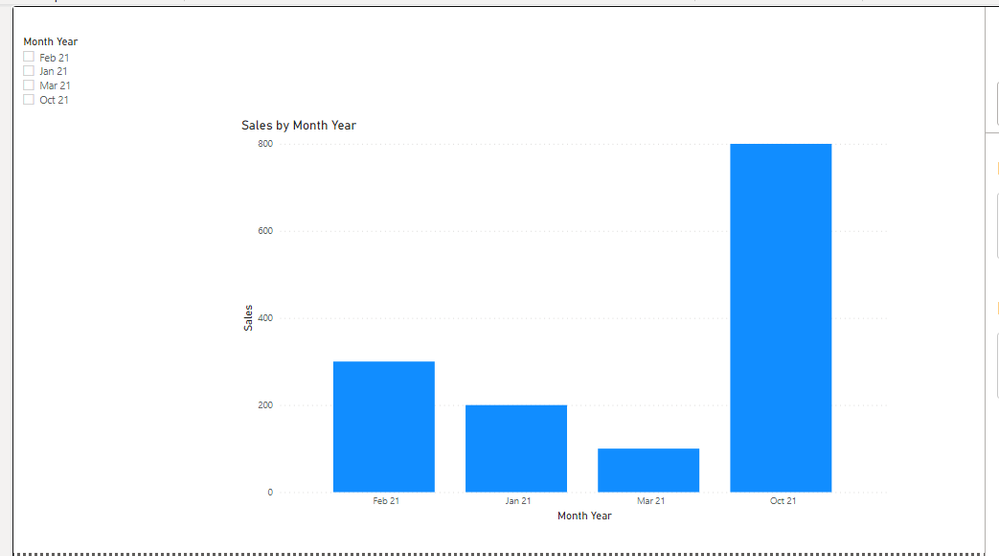
@amikm let's assume you have a calendar dimension in your model, if not then add one following my blog post here Create a basic Date table in your data model for Time Intelligence calculations | PeryTUS IT Solutio...
One you have above table, use month on slicer from this table and also on the visual on x-axis use month from this table, add following measure and use it in the visual:
Sales Default =
VAR __date = TODAY()
VAR __NumberOfMonths = CALCULATE ( DISTINCTCOUNT ( 'Calendar'[Month] ), ALLSELECTED ( ) )
VAR __startDate = IF ( __NumberOfMonths = 1, MIN ( 'Calendar'[Date] ), EOMONTH ( __date, -1 ) + 1 )
VAR __endDate = IF ( __NumberOfMonths = 1, MAX ( 'Calendar'[Date] ), EOMONTH ( __date, 0 ) )
RETURN

CALCULATE (
    SUM ( YourTable[Sales Columns] ),
    KEEPFILTERS ( DATESBETWEEN ( 'Calendar'[Date], __startDate, __endDate ) )
)
✨ Follow us on LinkedIn
Check my latest blog post The Power of Using Calculation Groups with Inactive Relationships (Part 1) (perytus.com) I would ❤ Kudos if my solution helped. 👉 If you can spend time posting the question, you can also make efforts to give Kudos to whoever helped to solve your problem. It is a token of appreciation!
⚡ Visit us at https://perytus.com, your one-stop-shop for Power BI-related projects/training/consultancy.⚡
Subscribe to the @PowerBIHowTo YT channel for an upcoming video on List and Record functions in Power Query!!
Learn Power BI and Fabric - subscribe to our YT channel - Click here: @PowerBIHowTo
If my solution proved useful, I'd be delighted to receive Kudos. When you put effort into asking a question, it's equally thoughtful to acknowledge and give Kudos to the individual who helped you solve the problem. It's a small gesture that shows appreciation and encouragement! ❤
Did I answer your question? Mark my post as a solution. Proud to be a Super User! Appreciate your Kudos 🙂
Feel free to email me with any of your BI needs.