Join us at FabCon Atlanta from March 16 - 20, 2026, for the ultimate Fabric, Power BI, AI and SQL community-led event. Save $200 with code FABCOMM.
Register now!The Power BI Data Visualization World Championships is back! Get ahead of the game and start preparing now! Learn more
Hi All,
Is it possible to shift the rows in the table to the column?
EG:
This is my Sheet where I need to entire row to be separated (Percentage values) into new columns
Raw :
Output:
Thanks in advance.
Hi @KoliCharan ,
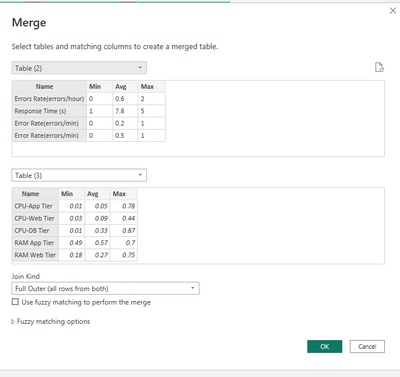
Please refer to my pbix file to see if it helps you.
let
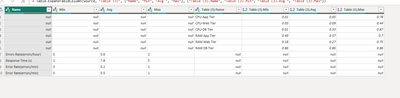
Source = Table.NestedJoin(#"Table (2)", {"Name"}, #"Table (3)", {"Name"}, "Table (3)", JoinKind.FullOuter),
#"Expanded Table (3)" = Table.ExpandTableColumn(Source, "Table (3)", {"Name", "Min", "Avg ", "Max"}, {"Table (3).Name", "Table (3).Min", "Table (3).Avg ", "Table (3).Max"})
in
#"Expanded Table (3)"
How to Get Your Question Answered Quickly
If it does not help, please provide more details with your desired output and pbix file without privacy information (or some sample data) .
Best Regards
Community Support Team _ Polly
If this post helps, then please consider Accept it as the solution to help the other members find it more quickly.
Hi @Anonymous
This helps me so point and I will work with it one more help can I have a sample dashboard of how we can showcase the min, max, and average values in the dashboard?
and how to eliminate the null values.
Thanks in advance
Do you wan't help to do this in Power BI ? or Excel ? or something else ?
The Power BI Data Visualization World Championships is back! Get ahead of the game and start preparing now!
| User | Count |
|---|---|
| 58 | |
| 45 | |
| 39 | |
| 39 | |
| 21 |
| User | Count |
|---|---|
| 175 | |
| 138 | |
| 118 | |
| 80 | |
| 54 |