cancel
Showing results for 
Search instead for 
Did you mean: 

Vote for your favorite vizzies from the Power BI Dataviz World Championship submissions. Vote now!

Reply
LucasCamargo
Helper I
Helper I

How to set my Slicer Date with only existing date

Hello!


I created a table using CalendarAuto, so, when I create a Slicer to see the date, it shows me all Years/months/days available.


How do I set my Slicer Date with only Years/Months/Days that existis in my personal Dataset?


Ps: I already tried put the date column that I have in my personal dataset as filter to the slicer, selecting "is not blank or empty", but it didn't help me at all.

1 ACCEPTED SOLUTION
Idrissshatila
Super User
Super User

Hello @LucasCamargo ,


try the following

Calendar = CALENDARMIN(YourTableName[Date] ) , MAX( YourTableName[Date] ) )
 

If I answered your question, please mark my post as solution, Appreciate your Kudos 👍

Follow me on Linkedin
Vote for my Community Mobile App Idea 💡


Did I answer your question? Mark my post as a solution! Appreciate your Kudos
Follow me on LinkedIn linkedIn
Vote for my Community Mobile App Idea

Proud to be a Super User!


View solution in original post

4 REPLIES 4
Idrissshatila
Super User
Super User

Hello @LucasCamargo ,


try the following

Calendar = CALENDARMIN(YourTableName[Date] ) , MAX( YourTableName[Date] ) )
 

If I answered your question, please mark my post as solution, Appreciate your Kudos 👍

Follow me on Linkedin
Vote for my Community Mobile App Idea 💡


Did I answer your question? Mark my post as a solution! Appreciate your Kudos
Follow me on LinkedIn linkedIn
Vote for my Community Mobile App Idea

Proud to be a Super User!


Hi Idris, thank you for the attention.

It kinda works, but not properly still.

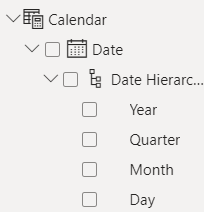
LucasCamargo_0-1695931844590.png

If i select only the "Date" box, it shows me only the existing dates in my database, but when I select the month on Date Hierarchy, It still shows me all the 12 months, even don't having all of them on my database.


Hello @LucasCamargo ,


Yes because it takes the minimum of your data and max and gives you everything in between, if you need only the dates you have then you could use the column you have in your date table and add month, year and day columns to it.


Year = Year('Youtablename' [Date])
Month = format ( 'Youtablename' [Date], "mmmm")

Day = Day ( 'Youtablename' [Date])


If I answered your question, please mark my post as solution, Appreciate your Kudos 👍

Follow me on Linkedin
Vote for my Community Mobile App Idea 💡


Did I answer your question? Mark my post as a solution! Appreciate your Kudos
Follow me on LinkedIn linkedIn
Vote for my Community Mobile App Idea

Proud to be a Super User!


Thank you again Idris, I thought the "Date Hieararchy" had this filter by itself, but the way you put above worked.

The only thing is: before all that, I had an Excel Sheet with 2023 dates. Using an external database, I used Power Query to create a "week of month" column and structered it so that it started the week on Monday (Power BI normally starts weeks on Sundays).


Is it possible to create a Week of Month like that, without using Power Query? (Using the table I created with you step-by-step)

Helpful resources

Announcements
Power BI DataViz World Championships

Power BI Dataviz World Championships

Vote for your favorite vizzies from the Power BI World Championship submissions!

Sticker Challenge 2026 Carousel

Join our Community Sticker Challenge 2026

If you love stickers, then you will definitely want to check out our Community Sticker Challenge!

January Power BI Update Carousel

Power BI Monthly Update - January 2026

Check out the January 2026 Power BI update to learn about new features.

FabCon Atlanta 2026 carousel

FabCon Atlanta 2026

Join us at FabCon Atlanta, March 16-20, for the ultimate Fabric, Power BI, AI and SQL community-led event. Save $200 with code FABCOMM.