cancel
Showing results for 
Search instead for 
Did you mean: 

The Power BI Data Visualization World Championships is back! Get ahead of the game and start preparing now! Learn more

Reply
v-ankitgupta
Microsoft Employee
Microsoft Employee

How to set dynamic conditional formatting on color of gauge chart?

Screenshot 2022-12-08 155436.png


In my PowerBi report, I have added a guage chart, and applied conditional formatting, based upon 2 values:

  • Target
  • Actual Value

If the actual value is more than target, then the gauge chart will be green otherwise red. Now, based upon the data selected in a multi select drop down, the values of both 'Target' and 'Actual value' changes. Therefore, I want to have a dynamic conditional formatting for the guage chart where the conditional formatting for color is applied correctly according to different targets and their respective actual values.


For example:

Target;Actual Value;Color of Chart
8584Red
7779Green
6571Green


However, as displayed in the attached screenshot, the highlighted box expects a hardcoded numeric value. Please advise how to achieve this. Thanks in advance.

1 ACCEPTED SOLUTION
v-jianboli-msft
Community Support
Community Support

Hi @v-ankitgupta ,


Please try:

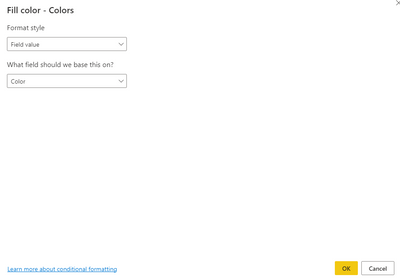
vjianbolimsft_0-1670549838268.png

Color = IF(SUM('Table'[Actual Value;])>SUM('Table'[Target;]),"Green","Red")

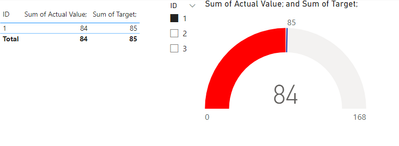
Final output:

vjianbolimsft_1-1670549897162.png

vjianbolimsft_2-1670549908271.png

Best Regards,

Jianbo Li

If this post helps, then please consider Accept it as the solution to help the other members find it more quickly.

View solution in original post

3 REPLIES 3
v-jianboli-msft
Community Support
Community Support

Hi @v-ankitgupta ,


Please try:

vjianbolimsft_0-1670549838268.png

Color = IF(SUM('Table'[Actual Value;])>SUM('Table'[Target;]),"Green","Red")

Final output:

vjianbolimsft_1-1670549897162.png

vjianbolimsft_2-1670549908271.png

Best Regards,

Jianbo Li

If this post helps, then please consider Accept it as the solution to help the other members find it more quickly.

A very belated thank you for posting this, works like a dream!

It worked Jianbo, Thank you very much.

Helpful resources

Announcements
Power BI DataViz World Championships

Power BI Dataviz World Championships

The Power BI Data Visualization World Championships is back! Get ahead of the game and start preparing now!

December 2025 Power BI Update Carousel

Power BI Monthly Update - December 2025

Check out the December 2025 Power BI Holiday Recap!

FabCon Atlanta 2026 carousel

FabCon Atlanta 2026

Join us at FabCon Atlanta, March 16-20, for the ultimate Fabric, Power BI, AI and SQL community-led event. Save $200 with code FABCOMM.