Join us at FabCon Atlanta from March 16 - 20, 2026, for the ultimate Fabric, Power BI, AI and SQL community-led event. Save $200 with code FABCOMM.
Register now!The Power BI Data Visualization World Championships is back! Get ahead of the game and start preparing now! Learn more
Hi there,
Recently i try to use the function - Incremental refresh and i follow the following tutorial step by step.
https://docs.microsoft.com/en-us/power-bi/admin/service-premium-incremental-refresh
however, I found a problem and cant solve it. I get data source from my folder and get a huge number of CSV file.
after I open the manage parameters and set the
Type: Date and Time
Suggested values: any value
Current Value: my selected date (eg. 10/10/2020 )
the Queries shown that:
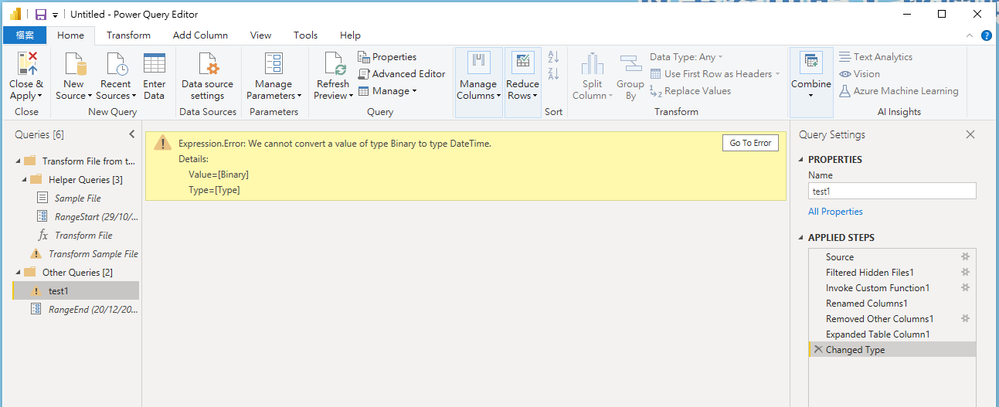
Expression.Error: We cannot convert a value of type Binary to type DateTime.
Details:
Value=[Binary]
Type=[Type]
and:
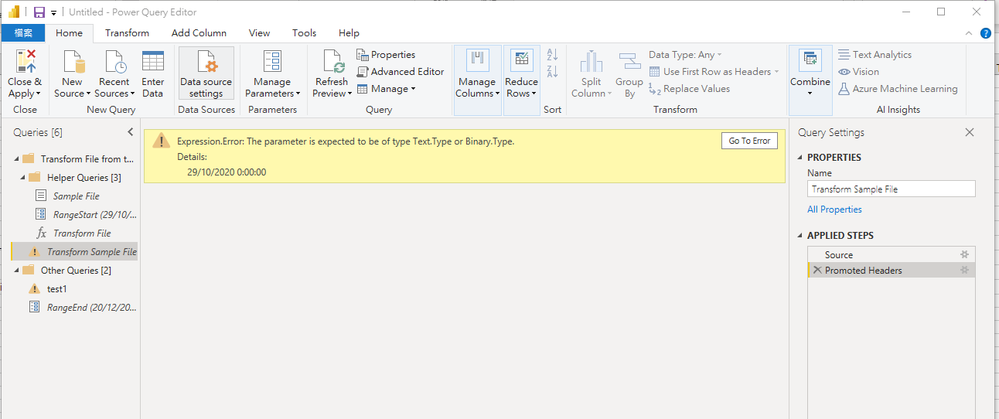
Expression.Error: The parameter is expected to be of type Text.Type or Binary.Type.
Details:
29/10/2020 0:00:00
how to solve thsi problem or incremental refrsh cant apply to get data source: folder??
@Anonymous , you are getting wrong values in the column or the transformation is failing. Click on the very first step and check value .
refer how to handle error in power query
https://www.youtube.com/watch?v=OE6DPmKqN7s
https://www.youtube.com/watch?v=9-Lag0VOiTs
Also refer : debug issue
https://www.youtube.com/watch?v=OE6DPmKqN7s
The Power BI Data Visualization World Championships is back! Get ahead of the game and start preparing now!
| User | Count |
|---|---|
| 41 | |
| 39 | |
| 37 | |
| 29 | |
| 24 |
| User | Count |
|---|---|
| 122 | |
| 110 | |
| 83 | |
| 69 | |
| 68 |