Join us at FabCon Atlanta from March 16 - 20, 2026, for the ultimate Fabric, Power BI, AI and SQL community-led event. Save $200 with code FABCOMM.
Register now!Get Fabric Certified for FREE during Fabric Data Days. Don't miss your chance! Request now
Hi,
I have a column A that contains sentences. In column B, I want to search for particular words in Column A. if a particular word is found in Column A, then I want to return the value that was found, rather than a true/ false value, or the starting position number of the word found. I have looked at text.contains in the M language, and in DAX, have looked at SEARCH, RELATED, MID etc. but nothing seems to give me what I wanted.
Any help would be appreciated.
Thanks,
Patricia
Hi @PK316,
By my test, you could create a calculated column with the formula below.
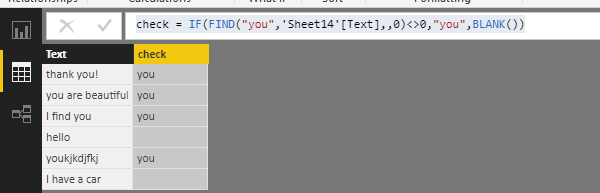
check = IF ( FIND ( "you", 'Sheet14'[Text],, 0 ) <> 0, "you", BLANK () )
Then you could get the output below.
Hope it can help you!
Best Regards,
Cherry
Thank you for this response. The problem is that I have a list of search terms that I want to use, and dependent on the search term found, the value for to be returned if true will be different thus needs to be read from a list also and not hardcoded.
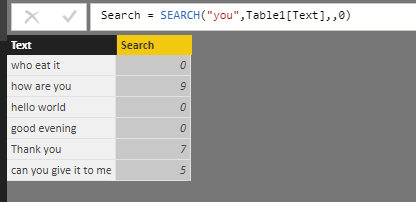
The search formula work fine to me:
Check out the November 2025 Power BI update to learn about new features.
Advance your Data & AI career with 50 days of live learning, contests, hands-on challenges, study groups & certifications and more!