I have a tooltip page which displays the time of an event when it is hovered over on a line chart - this works well. The field being used in the card on the tooltip is a Time Only type and has a summation method of "earliest".
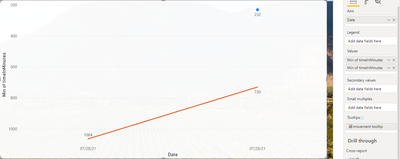
Line Chart:
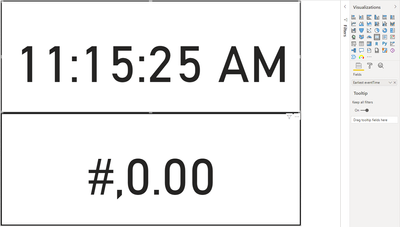
Tooltip page with the top card selected:
The problem is if there is no data for the day (axis value on line chart) then the tooltip displays "(Blank)". I would like to change this to the string "Not Detected".
I have tried creating a measure:
event1Time tooltip =
var result = MIN(event1table[eventTime])
return
if(
result = BLANK(),
"Not Detected",
result
)
But it seems that the MIN() function doesnt work properly with a "Time Only" formatted column. The measure properly returns the string when it is blank, but returns "#,0.00" when there is a value, as seen above on the bottom card on the tooltip.
I also have a column called TimeInMinutes which is an integer column representing the number of minutes from 12:00am. I use this to display the Y-axis properly on the line chart. I can use this in the measure to get the right row by using min(TimeInMinuites), but then I cant figure out how to return the corresponding eventTime column which is properly formatted for display.
Is there a function like MIN() which works on time values? I've tried using EARLIEST() but it doesnt seem that this functions the same way as the "earliest" summation method. Or is there a different reason my MIN() function is outputting a strange value?
OR... is there a way to use my TimeInMinutes (integer) value to get the right row in the table, then return the eventTime (time only) column for that row in the same table? All I can find is the RELATED() function, but this is to reference two tables, not two columns in the same table.
Sorry for the long post - this one has me stumped though.
Thanks for the help! This community is fantastic.


