FabCon is coming to Atlanta
Join us at FabCon Atlanta from March 16 - 20, 2026, for the ultimate Fabric, Power BI, AI and SQL community-led event. Save $200 with code FABCOMM.
Register now!- Power BI forums
- Get Help with Power BI
- Desktop
- Service
- Report Server
- Power Query
- Mobile Apps
- Developer
- DAX Commands and Tips
- Custom Visuals Development Discussion
- Health and Life Sciences
- Power BI Spanish forums
- Translated Spanish Desktop
- Training and Consulting
- Instructor Led Training
- Dashboard in a Day for Women, by Women
- Galleries
- Data Stories Gallery
- Themes Gallery
- Contests Gallery
- QuickViz Gallery
- Quick Measures Gallery
- Visual Calculations Gallery
- Notebook Gallery
- Translytical Task Flow Gallery
- TMDL Gallery
- R Script Showcase
- Webinars and Video Gallery
- Ideas
- Custom Visuals Ideas (read-only)
- Issues
- Issues
- Events
- Upcoming Events
The Power BI Data Visualization World Championships is back! Get ahead of the game and start preparing now! Learn more
- Power BI forums
- Forums
- Get Help with Power BI
- Desktop
- Re: How to return 'TRUE' if string matches certain...
- Subscribe to RSS Feed
- Mark Topic as New
- Mark Topic as Read
- Float this Topic for Current User
- Bookmark
- Subscribe
- Printer Friendly Page


- Mark as New
- Bookmark
- Subscribe
- Mute
- Subscribe to RSS Feed
- Permalink
- Report Inappropriate Content
How to return 'TRUE' if string matches certain specific structure
Hi all. Late afternoon and brain is failing.
Can someone help me fix a custom column where I need to return 'true' if a string starts with XX_XX_XX_, where X can be any character and the string may continue, with more underscores and characters after the last underscore in my example. I'd normally use regex for this kind of thing.
Any help gratefully appreciated.
Solved! Go to Solution.


- Mark as New
- Bookmark
- Subscribe
- Mute
- Subscribe to RSS Feed
- Permalink
- Report Inappropriate Content
Hi @JonSwed ,
This was interesting, yet a bit cumbersome.

It is all about pulling the characters from the string after getting them based on their position.
The first thing I did was easy to check on the underscore. The more problamatic one is the Alpha characters which can include anything not numeric, like an underscore. If you paste the code into a blank query in the Advanced Editor, you will see what I did. The first 7 or 8 steps were just to clean up the table. I just did a proof of concept as far as the alpha characters. You will have to add the rest of the alphabet, and lower case if those might be true.
let
    Source = Table.FromRows(Json.Document(Binary.Decompress(Binary.FromText("i45Wcg+NdwyJD3CNLynKLy1OLSqOTyrNK1awVSgpKk1VitWJVgITMGXYJBILCnJSiyGSaYk5xUiyufl52amVxU6piSCDM4tSiuOTE0uK41Py04tRVMc7OirFxgIA", BinaryEncoding.Base64), Compression.Deflate)), let _t = ((type nullable text) meta [Serialized.Text = true]) in type table [Column1 = _t]),
    #"Changed Type" = Table.TransformColumnTypes(Source,{{"Column1", type text}}),
    #"Replaced Value" = Table.ReplaceValue(#"Changed Type","= true","",Replacer.ReplaceText,{"Column1"}),
    #"Replaced Value1" = Table.ReplaceValue(#"Replaced Value","= false","",Replacer.ReplaceText,{"Column1"}),
    #"Trimmed Text" = Table.TransformColumns(#"Replaced Value1",{{"Column1", Text.Trim, type text}}),
    #"Cleaned Text" = Table.TransformColumns(#"Trimmed Text",{{"Column1", Text.Clean, type text}}),
    #"Trimmed Text1" = Table.TransformColumns(#"Cleaned Text",{{"Column1", Text.Trim, type text}}),
    #"Filtered Rows" = Table.SelectRows(#"Trimmed Text1", each ([Column1] <> "")),
    #"Added Custom" = Table.AddColumn(#"Filtered Rows", "Custom", each Text.At([Column1],2)),
    #"Added Custom1" = Table.AddColumn(#"Added Custom", "If underscore is present", each if Text.At([Column1],2)="_" and Text.At([Column1],5)="_"then "True" else "False"),
    #"Added Custom2" = Table.AddColumn(#"Added Custom1", "Custom.2", each Value.Is(Value.FromText(Text.At([Column1],0)), type text
)),
    #"Added Custom3" = Table.AddColumn(#"Added Custom2", "If first and second letter are Alpha", each if List.Contains({"A","G"},Text.At([Column1],0))  and List.Contains({"A","U"},Text.At([Column1],1)) then "True" else "False"),
    #"Renamed Columns" = Table.RenameColumns(#"Added Custom3",{{"Custom", "Return character test"}}),
    #"Removed Columns" = Table.RemoveColumns(#"Renamed Columns",{"Custom.2"}),
    #"Added Conditional Column" = Table.AddColumn(#"Removed Columns", "Combine cols", each if [If underscore is present] = "True" and [If first and second letter are Alpha] = "True"then true else false)
in
    #"Added Conditional Column"
You may pm if you have any questions.
Let me know if you have any questions. (You can combine both columns into one)
If this solves your issues, please mark it as the solution, so that others can find it easily. Kudos 👍are nice too.
Nathaniel
Did I answer your question? Mark my post as a solution!
Proud to be a Super User!

- Mark as New
- Bookmark
- Subscribe
- Mute
- Subscribe to RSS Feed
- Permalink
- Report Inappropriate Content
You can still wield regex in Power Query
let
    RE = (regex as text, str as text) =>
    let
        html = "<script>var regex = " & regex & "; var str = """ & str & """; var res = regex.test(str); document.write(res)</script>",
        res = Web.Page(html)[Data]{0}[Children]{0}[Children]{1}[Text]{0}
    in res,
    Source = Table.FromRows(Json.Document(Binary.Decompress(Binary.FromText("i45Wcg+NdwyJD3CNLynKLy1OLSqOTyrNK1aK1UFIwTiJBQU5qcUwgdz8vOzUymKn1ESQnsyilOL45MSS4viU/HSI9nhHR6XYWAA=", BinaryEncoding.Base64), Compression.Deflate)), let _t = ((type nullable text) meta [Serialized.Text = true]) in type table [Column = _t]),
    #"Added Custom" = Table.AddColumn(Source, "Test", each RE("/\b[a-z]{2}(_[a-z]{2}){2,}.*/gi", [Column]))
in
    #"Added Custom"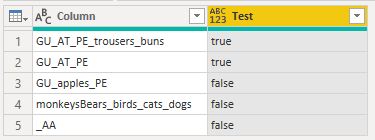
| Thanks to the great efforts by MS engineers to simplify syntax of DAX! Most beginners are SUCCESSFULLY MISLED to think that they could easily master DAX; but it turns out that the intricacy of the most frequently used RANKX() is still way beyond their comprehension! |
DAX is simple, but NOT EASY! |
- Mark as New
- Bookmark
- Subscribe
- Mute
- Subscribe to RSS Feed
- Permalink
- Report Inappropriate Content
Hi Nathaniel_C - it would be false if those first 9 characters do not match the pattern XX_XX_XX_
For example:
GU_AT_PE_trousers_buns = true
GU_AT_PE = true
GU_apples_PE = false
monkeysBears_birds_cats_dogs = false
- Mark as New
- Bookmark
- Subscribe
- Mute
- Subscribe to RSS Feed
- Permalink
- Report Inappropriate Content
Hi @JonSwed ,
This was interesting, yet a bit cumbersome.
It is all about pulling the characters from the string after getting them based on their position.
The first thing I did was easy to check on the underscore. The more problamatic one is the Alpha characters which can include anything not numeric, like an underscore. If you paste the code into a blank query in the Advanced Editor, you will see what I did. The first 7 or 8 steps were just to clean up the table. I just did a proof of concept as far as the alpha characters. You will have to add the rest of the alphabet, and lower case if those might be true.
let
    Source = Table.FromRows(Json.Document(Binary.Decompress(Binary.FromText("i45Wcg+NdwyJD3CNLynKLy1OLSqOTyrNK1awVSgpKk1VitWJVgITMGXYJBILCnJSiyGSaYk5xUiyufl52amVxU6piSCDM4tSiuOTE0uK41Py04tRVMc7OirFxgIA", BinaryEncoding.Base64), Compression.Deflate)), let _t = ((type nullable text) meta [Serialized.Text = true]) in type table [Column1 = _t]),
    #"Changed Type" = Table.TransformColumnTypes(Source,{{"Column1", type text}}),
    #"Replaced Value" = Table.ReplaceValue(#"Changed Type","= true","",Replacer.ReplaceText,{"Column1"}),
    #"Replaced Value1" = Table.ReplaceValue(#"Replaced Value","= false","",Replacer.ReplaceText,{"Column1"}),
    #"Trimmed Text" = Table.TransformColumns(#"Replaced Value1",{{"Column1", Text.Trim, type text}}),
    #"Cleaned Text" = Table.TransformColumns(#"Trimmed Text",{{"Column1", Text.Clean, type text}}),
    #"Trimmed Text1" = Table.TransformColumns(#"Cleaned Text",{{"Column1", Text.Trim, type text}}),
    #"Filtered Rows" = Table.SelectRows(#"Trimmed Text1", each ([Column1] <> "")),
    #"Added Custom" = Table.AddColumn(#"Filtered Rows", "Custom", each Text.At([Column1],2)),
    #"Added Custom1" = Table.AddColumn(#"Added Custom", "If underscore is present", each if Text.At([Column1],2)="_" and Text.At([Column1],5)="_"then "True" else "False"),
    #"Added Custom2" = Table.AddColumn(#"Added Custom1", "Custom.2", each Value.Is(Value.FromText(Text.At([Column1],0)), type text
)),
    #"Added Custom3" = Table.AddColumn(#"Added Custom2", "If first and second letter are Alpha", each if List.Contains({"A","G"},Text.At([Column1],0))  and List.Contains({"A","U"},Text.At([Column1],1)) then "True" else "False"),
    #"Renamed Columns" = Table.RenameColumns(#"Added Custom3",{{"Custom", "Return character test"}}),
    #"Removed Columns" = Table.RemoveColumns(#"Renamed Columns",{"Custom.2"}),
    #"Added Conditional Column" = Table.AddColumn(#"Removed Columns", "Combine cols", each if [If underscore is present] = "True" and [If first and second letter are Alpha] = "True"then true else false)
in
    #"Added Conditional Column"
You may pm if you have any questions.
Let me know if you have any questions. (You can combine both columns into one)
If this solves your issues, please mark it as the solution, so that others can find it easily. Kudos 👍are nice too.
Nathaniel
Did I answer your question? Mark my post as a solution!
Proud to be a Super User!
- Mark as New
- Bookmark
- Subscribe
- Mute
- Subscribe to RSS Feed
- Permalink
- Report Inappropriate Content
Hi @JonSwed ,
Please explain what a value would look like if it was not true? Is it the 3 underscores?
Let me know if you have any questions.
If this solves your issues, please mark it as the solution, so that others can find it easily. Kudos 👍are nice too.
Nathaniel
Did I answer your question? Mark my post as a solution!
Proud to be a Super User!

Helpful resources

Power BI Dataviz World Championships
The Power BI Data Visualization World Championships is back! Get ahead of the game and start preparing now!

Power BI Monthly Update - November 2025
Check out the November 2025 Power BI update to learn about new features.

FabCon Atlanta 2026
Join us at FabCon Atlanta, March 16-20, for the ultimate Fabric, Power BI, AI and SQL community-led event. Save $200 with code FABCOMM.


| User | Count |
|---|---|
| 200 | |
| 125 | |
| 102 | |
| 69 | |
| 53 |


