Join us at FabCon Atlanta from March 16 - 20, 2026, for the ultimate Fabric, Power BI, AI and SQL community-led event. Save $200 with code FABCOMM.
Register now!The Power BI Data Visualization World Championships is back! Get ahead of the game and start preparing now! Learn more
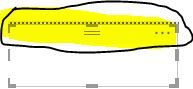
I always thought that this border was not something you could get rid of but I just had somebody send me one of there apps and the did not have this border at the top of each of their visualiations. Is there a setting to have this so it is not always at the top - it is so frustrating always getting in the way and limiting how close you can get to the top borders of a page.
Solved! Go to Solution.
@Anonymous,
Power BI has released new update from July 2018 with new visual headers.
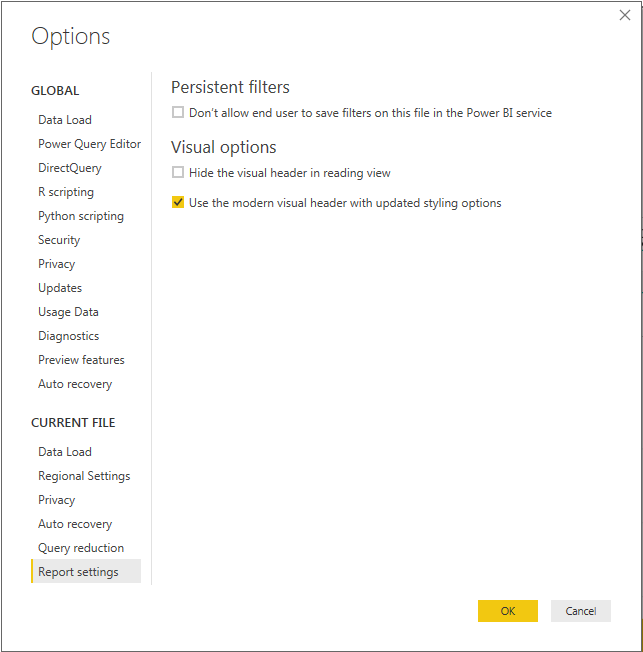
If you have updated PowerBI after July 2018, please go to:
Option and Settings -> Option -> Report Setting -> check "Use the modern visual header"
I hope this help. Thanks.
Duc
@Anonymous,
Power BI has released new update from July 2018 with new visual headers.
If you have updated PowerBI after July 2018, please go to:
Option and Settings -> Option -> Report Setting -> check "Use the modern visual header"
I hope this help. Thanks.
Duc
It sure did! Thanks much.
The Power BI Data Visualization World Championships is back! Get ahead of the game and start preparing now!
| User | Count |
|---|---|
| 38 | |
| 37 | |
| 33 | |
| 32 | |
| 29 |
| User | Count |
|---|---|
| 132 | |
| 88 | |
| 82 | |
| 68 | |
| 64 |