Join us at FabCon Atlanta from March 16 - 20, 2026, for the ultimate Fabric, Power BI, AI and SQL community-led event. Save $200 with code FABCOMM.
Register now!Get Fabric Certified for FREE during Fabric Data Days. Don't miss your chance! Request now
Hi All
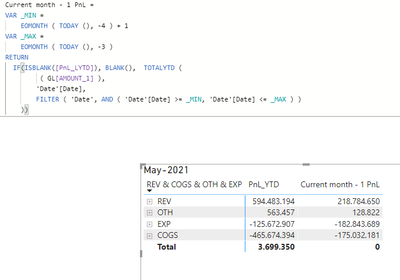
I have below expression from @amitchandak , is working fine , but i need to remove the extra row which is not necessary.
My PBI file :-
https://www.dropbox.com/s/2u3bhe54yk67ckp/PBT_V2021_400%20GL_TI.pbix?dl=0
Paul Yeo
Solved! Go to Solution.
Hi @admin11
Current month - 1 PnL =
VAR _MIN =
EOMONTH ( TODAY (), -4 ) + 1
VAR _MAX =
EOMONTH ( TODAY (), -3 )
RETURN
IF (
ISBLANK ( [PnL_LYTD] ),
BLANK (),
TOTALYTD (
( GL[AMOUNT_1] ),
'Date'[Date],
FILTER ( 'Date', AND ( 'Date'[Date] >= _MIN, 'Date'[Date] <= _MAX ) )
)
)
Regards
Miguel Félix
Proud to be a Super User!
Check out my blog: Power BI em PortuguêsHi @admin11
Current month - 1 PnL =
VAR _MIN =
EOMONTH ( TODAY (), -4 ) + 1
VAR _MAX =
EOMONTH ( TODAY (), -3 )
RETURN
IF (
ISBLANK ( [PnL_LYTD] ),
BLANK (),
TOTALYTD (
( GL[AMOUNT_1] ),
'Date'[Date],
FILTER ( 'Date', AND ( 'Date'[Date] >= _MIN, 'Date'[Date] <= _MAX ) )
)
)
Regards
Miguel Félix
Proud to be a Super User!
Check out my blog: Power BI em PortuguêsHi Paul,
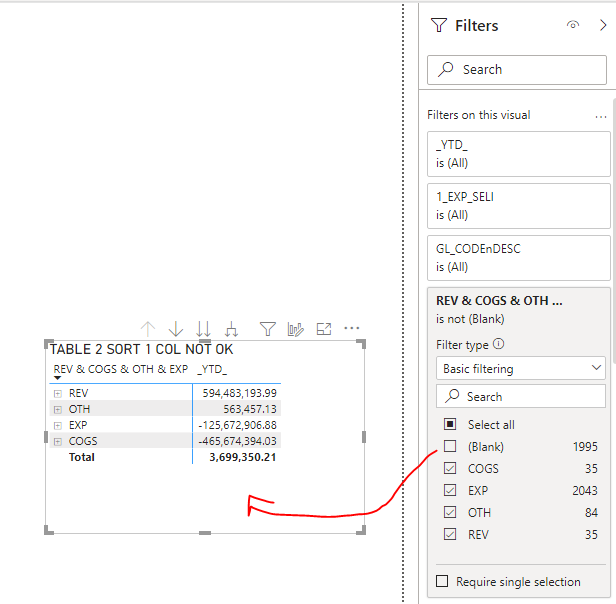
Uncheck the Blank box in the filters
Regards
Amine Jerbi
If I answered your question, please mark this thread as accepted
and you can follow me on
My Website, LinkedIn and Facebook
Check out the November 2025 Power BI update to learn about new features.
Advance your Data & AI career with 50 days of live learning, contests, hands-on challenges, study groups & certifications and more!