cancel
Showing results for 
Search instead for 
Did you mean: 

The FabCon + SQLCon recap series starts April 14th at 8am Pacific. If you’re tracking where AI is going inside Fabric, this first session is a can't miss. Register now

Reply
Anonymous
Not applicable

How to reference Table Visualization total in other table visualization?

Hello ,

I am converting excel report into power bi report.I have multiple table visulization and matrix visulizaiton in my report.Please see below dataset and final result table.In excel we can give cell reference but here How can I give TOTAL Reference(Prodcut A & Product B) in final table visulization.

Table Visulizaiton SAMPLE DATA 1


Table Visulizaiton
SAMPLE DATA 2

Product A

Quantity


Product B

Quantity

A

100


P

200

B

200


Q

300

C

300


R

400

Total

600


Total

900


Final Table Visulization


Product A

600


Product B

900


Total A+B

1500

  
1 ACCEPTED SOLUTION
v-yulgu-msft
Microsoft Employee
Microsoft Employee

Hi @Anonymous,


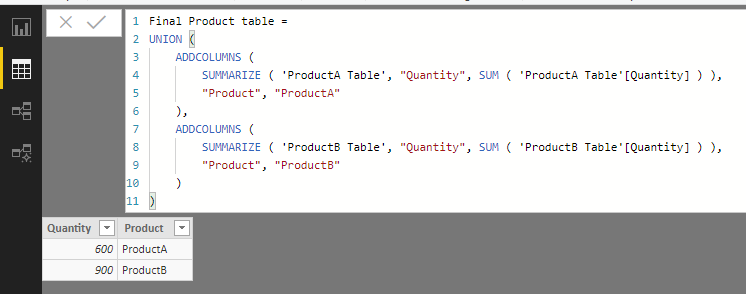
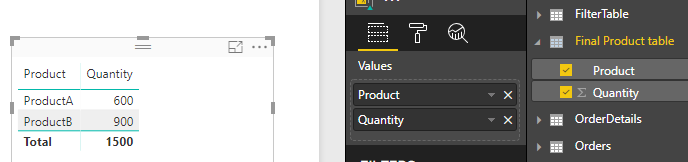
Based on my understanding, your data in visualization1 and visualization2 is from two different datasets, right? If so, to get the final output in Power BI desktop, you could create a calculated table like below, then, add it to table visual.

Final Product table =
UNION (
    ADDCOLUMNS (
        SUMMARIZE ( 'ProductA Table', "Quantity", SUM ( 'ProductA Table'[Quantity] ) ),
        "Product", "ProductA"
    ),
    ADDCOLUMNS (
        SUMMARIZE ( 'ProductB Table', "Quantity", SUM ( 'ProductB Table'[Quantity] ) ),
        "Product", "ProductB"
    )
)

1.PNG2.PNG


Best regards,

Yuliana Gu

Community Support Team _ Yuliana Gu
If this post helps, then please consider Accept it as the solution to help the other members find it more quickly.

View solution in original post

2 REPLIES 2
v-yulgu-msft
Microsoft Employee
Microsoft Employee

Hi @Anonymous,


Based on my understanding, your data in visualization1 and visualization2 is from two different datasets, right? If so, to get the final output in Power BI desktop, you could create a calculated table like below, then, add it to table visual.

Final Product table =
UNION (
    ADDCOLUMNS (
        SUMMARIZE ( 'ProductA Table', "Quantity", SUM ( 'ProductA Table'[Quantity] ) ),
        "Product", "ProductA"
    ),
    ADDCOLUMNS (
        SUMMARIZE ( 'ProductB Table', "Quantity", SUM ( 'ProductB Table'[Quantity] ) ),
        "Product", "ProductB"
    )
)

1.PNG2.PNG


Best regards,

Yuliana Gu

Community Support Team _ Yuliana Gu
If this post helps, then please consider Accept it as the solution to help the other members find it more quickly.
Anonymous
Not applicable

Thank you so much Yuliana.

Helpful resources

Announcements
New to Fabric survey Carousel

New to Fabric Survey

If you have recently started exploring Fabric, we'd love to hear how it's going. Your feedback can help with product improvements.

Power BI DataViz World Championships carousel

Power BI DataViz World Championships - June 2026

A new Power BI DataViz World Championship is coming this June! Don't miss out on submitting your entry.

Join our Fabric User Panel

Join our Fabric User Panel

Share feedback directly with Fabric product managers, participate in targeted research studies and influence the Fabric roadmap.

March Power BI Update Carousel

Power BI Community Update - March 2026

Check out the March 2026 Power BI update to learn about new features.