Join us at FabCon Atlanta from March 16 - 20, 2026, for the ultimate Fabric, Power BI, AI and SQL community-led event. Save $200 with code FABCOMM.
Register now!The Power BI Data Visualization World Championships is back! Get ahead of the game and start preparing now! Learn more
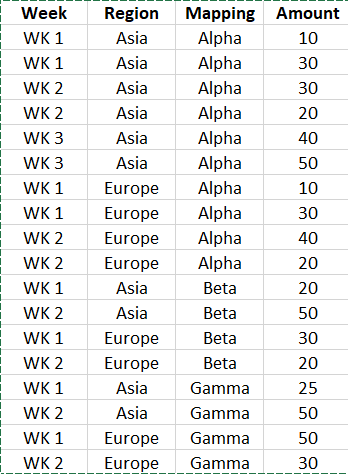
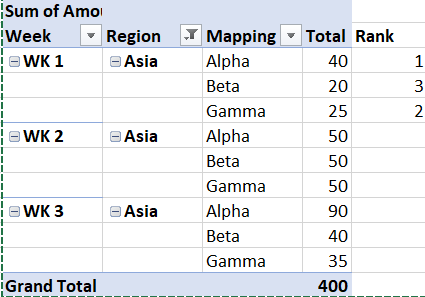
I would like to develop an visual to identify the weekly trend for the 2nd top mapping in different weeks by Region eg. Gamma. in Asia region in Week 1, 2 & 3
Would you please explain 1) How to rank by the criteria by region & Week 2)develop the weekly trend for the 2nd top mapping?
summary:
Solved! Go to Solution.
Hi @questions ,
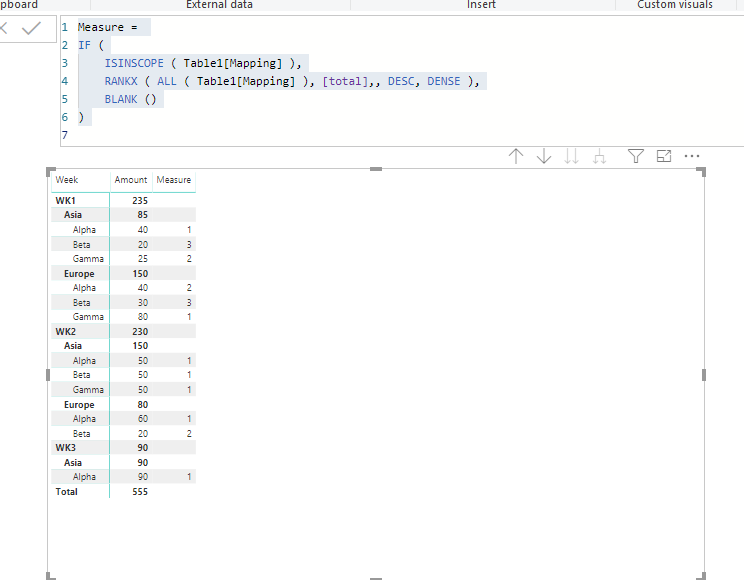
To create two measures as below and put the Rank Measure in a matrix
total = CALCULATE(SUM(Table1[Amount]))
Rank =
IF (
ISINSCOPE ( Table1[Mapping] ),
RANKX ( ALL ( Table1[Mapping] ), [total],, DESC, DENSE ),
BLANK ()
)
@questions look at this post which explains the ranking.
Subscribe to the @PowerBIHowTo YT channel for an upcoming video on List and Record functions in Power Query!!
Learn Power BI and Fabric - subscribe to our YT channel - Click here: @PowerBIHowTo
If my solution proved useful, I'd be delighted to receive Kudos. When you put effort into asking a question, it's equally thoughtful to acknowledge and give Kudos to the individual who helped you solve the problem. It's a small gesture that shows appreciation and encouragement! ❤
Did I answer your question? Mark my post as a solution. Proud to be a Super User! Appreciate your Kudos 🙂
Feel free to email me with any of your BI needs.
Thanks for sharing the above as the solution for the 1st question. However, how can I identify the 2nd rank in another visual? (which i ask in 2nd questions)
@questions can you explain what exactly you are looking in 2nd question?
Subscribe to the @PowerBIHowTo YT channel for an upcoming video on List and Record functions in Power Query!!
Learn Power BI and Fabric - subscribe to our YT channel - Click here: @PowerBIHowTo
If my solution proved useful, I'd be delighted to receive Kudos. When you put effort into asking a question, it's equally thoughtful to acknowledge and give Kudos to the individual who helped you solve the problem. It's a small gesture that shows appreciation and encouragement! ❤
Did I answer your question? Mark my post as a solution. Proud to be a Super User! Appreciate your Kudos 🙂
Feel free to email me with any of your BI needs.
I want to develop a visual to show the performance trend of the 2nd highest value item (can be Gamma in week 1 or Beta in week 3 depend on which week the audience select)...so if audience view the week 3 report, the graph will show Beta week 1-3 trend.If audience view week 1 report, the graph will show Gamma week 1 -3 trend.
Hi @questions ,
To create two measures as below and put the Rank Measure in a matrix
total = CALCULATE(SUM(Table1[Amount]))
Rank =
IF (
ISINSCOPE ( Table1[Mapping] ),
RANKX ( ALL ( Table1[Mapping] ), [total],, DESC, DENSE ),
BLANK ()
)
The Power BI Data Visualization World Championships is back! Get ahead of the game and start preparing now!
Check out the November 2025 Power BI update to learn about new features.
| User | Count |
|---|---|
| 59 | |
| 46 | |
| 42 | |
| 23 | |
| 18 |
| User | Count |
|---|---|
| 193 | |
| 124 | |
| 101 | |
| 67 | |
| 49 |