Join us at FabCon Atlanta from March 16 - 20, 2026, for the ultimate Fabric, Power BI, AI and SQL community-led event. Save $200 with code FABCOMM.
Register now!The Power BI Data Visualization World Championships is back! Get ahead of the game and start preparing now! Learn more
Hi,
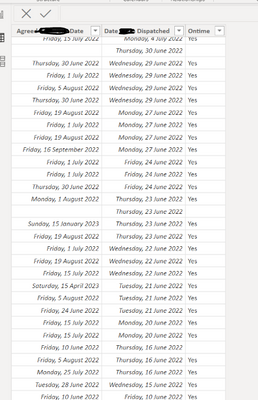
I have a table showing the agreed date, actual date, and whether it was dispatched on time (see below). I need to plot a line showing the % dispatched ontime for each month, how do I do that in PowerBI.
Solved! Go to Solution.
@Kampua , Try a measure like
divide(Countrows(filter(Table, Table[Ontime] = "Yes")),Countrows(Table))
refer, how two dates can use same date table - https://community.powerbi.com/t5/Community-Blog/HR-Analytics-Active-Employee-Hire-and-Termination-tr...
It works thanks 🙂
@Kampua , Try a measure like
divide(Countrows(filter(Table, Table[Ontime] = "Yes")),Countrows(Table))
refer, how two dates can use same date table - https://community.powerbi.com/t5/Community-Blog/HR-Analytics-Active-Employee-Hire-and-Termination-tr...
The Power BI Data Visualization World Championships is back! Get ahead of the game and start preparing now!
| User | Count |
|---|---|
| 38 | |
| 36 | |
| 33 | |
| 32 | |
| 29 |
| User | Count |
|---|---|
| 129 | |
| 88 | |
| 79 | |
| 68 | |
| 63 |