FabCon is coming to Atlanta
Join us at FabCon Atlanta from March 16 - 20, 2026, for the ultimate Fabric, Power BI, AI and SQL community-led event. Save $200 with code FABCOMM.
Register now!- Power BI forums
- Get Help with Power BI
- Desktop
- Service
- Report Server
- Power Query
- Mobile Apps
- Developer
- DAX Commands and Tips
- Custom Visuals Development Discussion
- Health and Life Sciences
- Power BI Spanish forums
- Translated Spanish Desktop
- Training and Consulting
- Instructor Led Training
- Dashboard in a Day for Women, by Women
- Galleries
- Data Stories Gallery
- Themes Gallery
- Contests Gallery
- QuickViz Gallery
- Quick Measures Gallery
- Visual Calculations Gallery
- Notebook Gallery
- Translytical Task Flow Gallery
- TMDL Gallery
- R Script Showcase
- Webinars and Video Gallery
- Ideas
- Custom Visuals Ideas (read-only)
- Issues
- Issues
- Events
- Upcoming Events
The Power BI Data Visualization World Championships is back! Get ahead of the game and start preparing now! Learn more
- Power BI forums
- Forums
- Get Help with Power BI
- Desktop
- Re: How to perform calculations on this measure
- Subscribe to RSS Feed
- Mark Topic as New
- Mark Topic as Read
- Float this Topic for Current User
- Bookmark
- Subscribe
- Printer Friendly Page


- Mark as New
- Bookmark
- Subscribe
- Mute
- Subscribe to RSS Feed
- Permalink
- Report Inappropriate Content
How to perform calculations on this measure
Hi,
I have this measure:
VAR thisdate =
MIN ( 'powerbi114 view_finance'[Date] )
VAR thisfirst =
MIN ( [Time of First Call] )
VAR prevdate =
CALCULATE (
MAX ( 'powerbi114 view_finance'[Date] ),
ALL ( 'powerbi114 view_finance' ),
VALUES ( 'powerbi114 view_finance'[carer_id] ),
'powerbi114 view_finance'[Date] < thisdate
)
VAR prevlast =
CALCULATE (
MAX ( 'powerbi114 view_finance'[Time of Last Call] ),
ALL ( 'powerbi114 view_finance' ),
VALUES ( 'powerbi114 view_finance'[carer_id] ),
'powerbi114 view_finance'[Date] = prevdate
)
RETURN
IF (
NOT ( ISBLANK ( prevdate ) ),
24
* FIXED ( ( thisdate + thisfirst ) - ( prevdate + prevlast ), 3 )
)
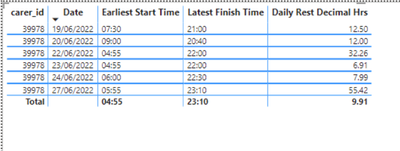
The issue I am having is how to perform calculations on the measure.
For example, I want a sum of all values < 11 but sumx does not work with boolean values.
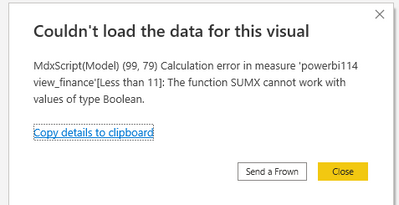
Solved! Go to Solution.


- Mark as New
- Bookmark
- Subscribe
- Mute
- Subscribe to RSS Feed
- Permalink
- Report Inappropriate Content
@Qotsa try:
Less than 11 =
SUMX(
    FILTER(
        SUMMARIZE(
            'powerbi114 view_finance',
            'powerbi114 view_finance'[carer_id],
            'powerbi114 view_finance'[Date]
       )
        [Daily Rest Decimal Hrs] < 11
    )
    ,1
)





- Mark as New
- Bookmark
- Subscribe
- Mute
- Subscribe to RSS Feed
- Permalink
- Report Inappropriate Content
Thks again. Can you explain what is happening here?
SUMX(
    FILTER(
        SUMMARIZE(
            'powerbi114 view_finance',
            'powerbi114 view_finance'[carer_id],
            'powerbi114 view_finance'[Date]
       )
- Mark as New
- Bookmark
- Subscribe
- Mute
- Subscribe to RSS Feed
- Permalink
- Report Inappropriate Content
SUMMARIZE(
            'powerbi114 view_finance',
            'powerbi114 view_finance'[carer_id],
            'powerbi114 view_finance'[Date]
       )
This is the distinct combination of these 2 columns.
Check out:
https://dax.guide/summarizea
- Mark as New
- Bookmark
- Subscribe
- Mute
- Subscribe to RSS Feed
- Permalink
- Report Inappropriate Content
Ok. Thanks very much.
- Mark as New
- Bookmark
- Subscribe
- Mute
- Subscribe to RSS Feed
- Permalink
- Report Inappropriate Content
@Qotsa my pleasure 🙂
Don't forget to check out my showcase report - really, got some high level stuff there. Sure you will find there a lot of cool ideas.
https://community.powerbi.com/t5/Data-Stories-Gallery/SpartaBI-Feat-Contoso-100K/td-p/2449543
Give it a thumbs up over there if you liked it 🙂
- Mark as New
- Bookmark
- Subscribe
- Mute
- Subscribe to RSS Feed
- Permalink
- Report Inappropriate Content
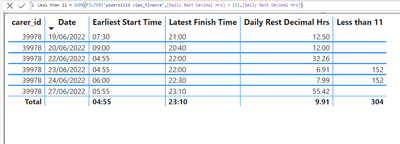
@Qotsa I think you are trying to do:
Less than 11 = SUMX(FILTER('powerbi114 view_finance',[Daily Rest Decimal Hrs] < 11),[Daily Rest Decimal Hrs])
- Mark as New
- Bookmark
- Subscribe
- Mute
- Subscribe to RSS Feed
- Permalink
- Report Inappropriate Content
- Mark as New
- Bookmark
- Subscribe
- Mute
- Subscribe to RSS Feed
- Permalink
- Report Inappropriate Content
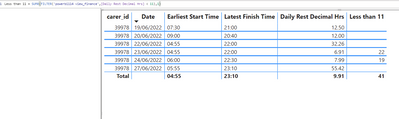
@Qotsa oh, so do this:) :
Less than 11 = SUMX(FILTER('powerbi114 view_finance',[Daily Rest Decimal Hrs] < 11),1)
- Mark as New
- Bookmark
- Subscribe
- Mute
- Subscribe to RSS Feed
- Permalink
- Report Inappropriate Content
It's getting closer.
- Mark as New
- Bookmark
- Subscribe
- Mute
- Subscribe to RSS Feed
- Permalink
- Report Inappropriate Content
@Qotsa try:
Less than 11 =
SUMX(
    FILTER(
        SUMMARIZE(
            'powerbi114 view_finance',
            'powerbi114 view_finance'[carer_id],
            'powerbi114 view_finance'[Date]
       )
        [Daily Rest Decimal Hrs] < 11
    )
    ,1
)
- Mark as New
- Bookmark
- Subscribe
- Mute
- Subscribe to RSS Feed
- Permalink
- Report Inappropriate Content
That's fantastic. I'm getting the correct results for <11.
When I change it tho to =, it doesn't return the desired result. Any idea why?

- Mark as New
- Bookmark
- Subscribe
- Mute
- Subscribe to RSS Feed
- Permalink
- Report Inappropriate Content
@Qotsa I guess it's not exactly 32.26 🙂
Try to verify by doing
Less than 11 =
SUMX(
    FILTER(
        SUMMARIZE(
            'powerbi114 view_finance',
            'powerbi114 view_finance'[carer_id],
            'powerbi114 view_finance'[Date]
       )
        [Daily Rest Decimal Hrs] > 32 && [Daily Rest Decimal Hrs] < 33
    )
    ,1
)
- Mark as New
- Bookmark
- Subscribe
- Mute
- Subscribe to RSS Feed
- Permalink
- Report Inappropriate Content
Yep, that gives correct result.

- Mark as New
- Bookmark
- Subscribe
- Mute
- Subscribe to RSS Feed
- Permalink
- Report Inappropriate Content
@Qotsa my pleasure 🙂
Please don't forget to accept the previous message as a solution for community visibility.
P.S. Check out my showcase report - got some high level stuff there. Sure you will find there a lot of cool ideas.
https://community.powerbi.com/t5/Data-Stories-Gallery/SpartaBI-Feat-Contoso-100K/td-p/2449543
Give it a thumbs up over there if you liked it 🙂

Helpful resources

Power BI Dataviz World Championships
The Power BI Data Visualization World Championships is back! Get ahead of the game and start preparing now!

Power BI Monthly Update - November 2025
Check out the November 2025 Power BI update to learn about new features.

FabCon Atlanta 2026
Join us at FabCon Atlanta, March 16-20, for the ultimate Fabric, Power BI, AI and SQL community-led event. Save $200 with code FABCOMM.

| User | Count |
|---|---|
| 59 | |
| 43 | |
| 42 | |
| 23 | |
| 17 |


| User | Count |
|---|---|
| 190 | |
| 122 | |
| 96 | |
| 66 | |
| 47 |


