cancel
Showing results for 
Search instead for 
Did you mean: 

Try your skills in the Power BI Dataviz World Championship! Round one ends June 26. Join now

Reply
BLB
Helper I
Helper I

How to pass a dynamic parameter to Power Query SQL code

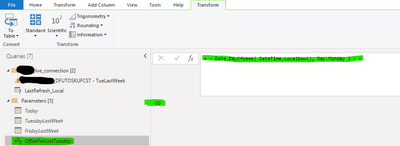
I would like to define a dynamic parameter which I can use in the SQL query to filter a specific date.

I created this query which is generating the correct number I want to use dynamically every day, but cannot use it in the SQL statement.


Any suggestions welcome please.


BLB_0-1686331049838.png


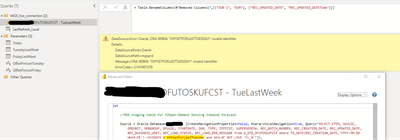
BLB_1-1686331182183.png


Thanks

5 REPLIES 5
DataInsights
Super User
Super User

@BLB,


Try concatenating the parameter in the SQL statement:


...SYSDATE + '" & OffsetForLastTuesday & "' and SKULOC...


Did I answer your question? Mark my post as a solution!

Proud to be a Super User!


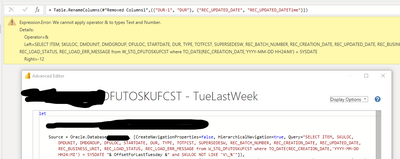
Thanks for the suggestion but now I am getting this error. 

BLB_1-1686520021408.png


@BLB,


Try adding the single quotes in my example. Also, the plus sign after SYSDATE in your original query is missing.


Did I answer your question? Mark my post as a solution!

Proud to be a Super User!


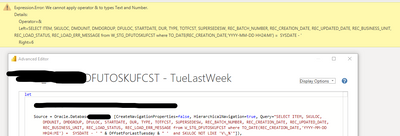
I tried all combinations, with ', ", &, on their own and in all combinations an none of them works for me. 

BLB_0-1686583265869.png


@BLB,


Try wrapping the parameter in Text.From. I think the parameter needs to be text in order to concatenate it with text.


Did I answer your question? Mark my post as a solution!

Proud to be a Super User!


Helpful resources

Announcements
Fabric Data Days is here Carousel

Fabric Data Days 2026

Don't miss out on Data Days, June 15 through August 7. Learn Fabric, Power BI, SQL, AI and more.

Power BI DataViz World Championships carousel

Power BI DataViz World Championships - June 2026

A new Power BI DataViz World Championship is coming this June! Don't miss out on submitting your entry.