cancel
Showing results for 
Search instead for 
Did you mean: 

Get Fabric certified for FREE! Don't miss your chance! Learn more

Reply
Anonymous
Not applicable

How to modify a report that isn't a .pbix file

Hi!  I have built 3 reports on one dataset.  The first report I can access in PowerBI Desktop because it's a .pbix file, but the other two aren't available to modify.  Is there a way to modify the other two reports in Power BI Desktop?

1 ACCEPTED SOLUTION

5 REPLIES 5
Anonymous
Not applicable

Thanks, John.  Will the downloaded report retain the dataset as its data source?  If yes, then that seems perfect.

Yes it will.

Anonymous
Not applicable

Sorry, I didn't make that clear.

The 3 reports are in the service, and they're all very similar.  I built the 2 follow-on reports by duplicating the original report in Desktop, deleting all the tables, and then pointing the report at the original report's dataset.  I then uploaded the report to the service, and have been refreshing it there ever since.  

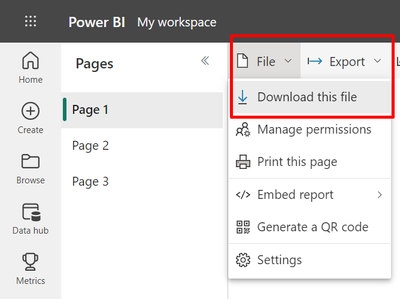
Hi @Anonymous , In the service you should have an option to  download this file which will generate a pbix file 

johncolley_0-1679439276460.png


If this answer solves your problem please mark it as a solution!

johncolley
Solution Sage
Solution Sage

Hi @Anonymous , can you provide more information on how the reports were created originally? Are they available in the service? 

Helpful resources

Announcements
Sticker Challenge 2026 Carousel

Join our Community Sticker Challenge 2026

If you love stickers, then you will definitely want to check out our Community Sticker Challenge!

January Power BI Update Carousel

Power BI Monthly Update - January 2026

Check out the January 2026 Power BI update to learn about new features.

FabCon Atlanta 2026 carousel

FabCon Atlanta 2026

Join us at FabCon Atlanta, March 16-20, for the ultimate Fabric, Power BI, AI and SQL community-led event. Save $200 with code FABCOMM.