
Join us at FabCon Atlanta from March 16 - 20, 2026, for the ultimate Fabric, Power BI, AI and SQL community-led event. Save $200 with code FABCOMM.
Register now!Get Fabric Certified for FREE during Fabric Data Days. Don't miss your chance! Request now
I want to use one check box. for that, i want to use slicer.
When using check box, it suppose to show only one checkbox with proper name.
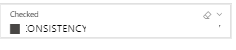
But, in slicer it's showing below (Checked, checkbox and its value).
I need some sleek checkbox which i want to see without any gap within height and width.
currently it's showing like below.
I want below sleek design. How to do this...?
Solved! Go to Solution.
I am taking the example of months, at top right there is the down arrow i had marked this in red
@saivina2920
Click on the down arror in front of checked and select dropdown. Then go to format plan and disable the slicer heading and in selection select the option to select the value (single select, multiselect with Ctrl or show all)
this way you can make your slicer similar as you want.
Everything ok except "Click on the down arror in front of checked and select dropdown. ".
I am not able to find "Click on the down arror in front of checked and select dropdown. "..
can you pls. show the screehshot...
I am taking the example of months, at top right there is the down arrow i had marked this in red
Check out the November 2025 Power BI update to learn about new features.
Advance your Data & AI career with 50 days of live learning, contests, hands-on challenges, study groups & certifications and more!