Join us at FabCon Atlanta from March 16 - 20, 2026, for the ultimate Fabric, Power BI, AI and SQL community-led event. Save $200 with code FABCOMM.
Register now!The Power BI Data Visualization World Championships is back! Get ahead of the game and start preparing now! Learn more
Hi All
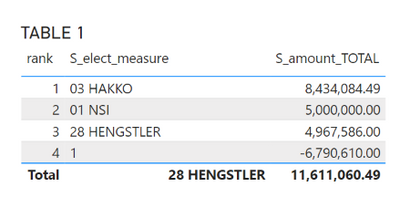
when convert chart :-
How to make Y axis display instead of display 1 to 4 , display Brand name ?
My PBI :-
https://www.dropbox.com/s/xbk184omq7qvs9u/SAMPLE_1000_SI_TI_V030.pbix?dl=0
Paul
Solved! Go to Solution.
Hi,
That reasoning does not make any sense to me. Sorry. I can help if you want to get the end result from the source Sales table itself. I have never appreciate writing calculated table formulas. The only time i do so is when i have to create a Calendar Table.
Hi,
Why have you created 3 calculated tables? Why not perform all your calculations on the Sales Table itself?
You ask a good question, it is because some time table is good for analysis but certain time we need to graphic to see the big different . like those -ve value.
Reasons i using Table 1 , is because i try to make use of dynamic dimension. so user can analyse by brand or segment in on table or chart.
Paul
Hi,
That reasoning does not make any sense to me. Sorry. I can help if you want to get the end result from the source Sales table itself. I have never appreciate writing calculated table formulas. The only time i do so is when i have to create a Calendar Table.
The Power BI Data Visualization World Championships is back! Get ahead of the game and start preparing now!
| User | Count |
|---|---|
| 39 | |
| 39 | |
| 37 | |
| 29 | |
| 24 |
| User | Count |
|---|---|
| 120 | |
| 95 | |
| 70 | |
| 69 | |
| 65 |