Join us at FabCon Atlanta from March 16 - 20, 2026, for the ultimate Fabric, Power BI, AI and SQL community-led event. Save $200 with code FABCOMM.
Register now!Get Fabric Certified for FREE during Fabric Data Days. Don't miss your chance! Request now
Hi All
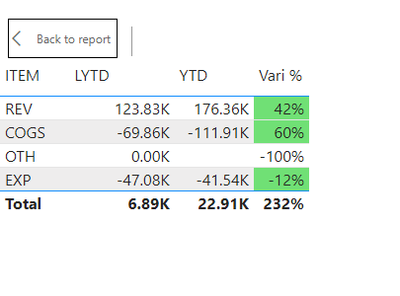
I have a P&L summary table , the Vari % is compare YTD vs LYTD.
Logically for Rev YTD vs LYTD amount increase , Vari % i can set to text black ground = Green is correct.
As we all know Revenue and Expense are totally different.
For Revenue increase is good.
But for Expense increase is bad.
Can some one share with me how to make Expense drop is good and Revenue drop is bad ?
My PBI file
Paul
Solved! Go to Solution.
Hi @admin11 ,
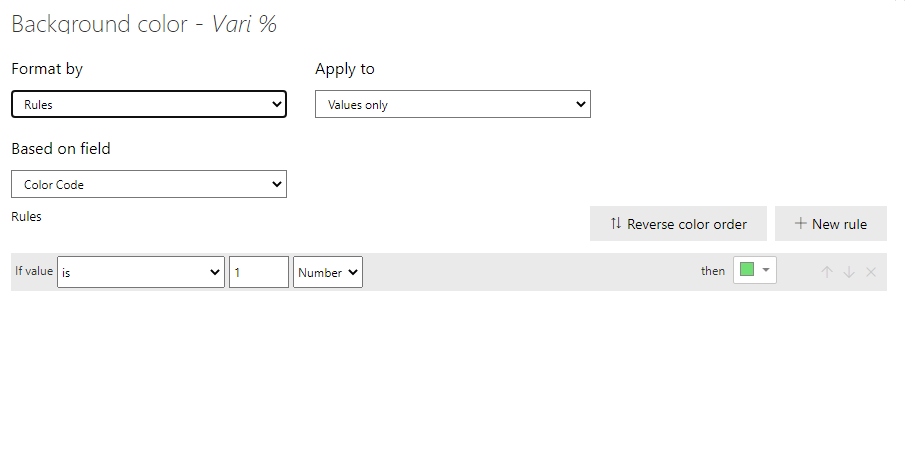
Create a measure like this
Color Code = SWITCH(SELECTEDVALUE(GL_Table_EXP[REV&COGS]),
"REV",IF([Vari %]*100>1,1,0),
"COGS",IF([Vari %]*100>0,1,0),
"EXP",IF([Vari %]*100<0,1,0),0)
This will give you the desired results:
Please accept this a solution if your question has been answered !!
Appreciate a Kudos 😀
Hi @admin11 ,
Create a measure like this
Color Code = SWITCH(SELECTEDVALUE(GL_Table_EXP[REV&COGS]),
"REV",IF([Vari %]*100>1,1,0),
"COGS",IF([Vari %]*100>0,1,0),
"EXP",IF([Vari %]*100<0,1,0),0)
This will give you the desired results:
Please accept this a solution if your question has been answered !!
Appreciate a Kudos 😀
Check out the November 2025 Power BI update to learn about new features.
Advance your Data & AI career with 50 days of live learning, contests, hands-on challenges, study groups & certifications and more!