Advance your Data & AI career with 50 days of live learning, dataviz contests, hands-on challenges, study groups & certifications and more!
Get registeredGet Fabric Certified for FREE during Fabric Data Days. Don't miss your chance! Request now
I am fairly new to Power BI.
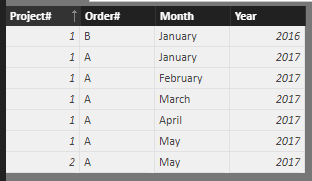
I want to generate a new table based on entries from an old table. The new table should hold one line per month per project and order number for the time perriod listed in the old table. I made a dummy table to illustrate the problem. How to do this?
Thank you in advanced for your input!
| Old Table | |||
| Project# | Order# | Month | Year |
| 1 | A | Jan | 2017 |
| 1 | A | Mar | 2017 |
| 1 | A | Mai | 2017 |
| 1 | B | Jan | 2016 |
| 2 | A | May | 2017 |
| New Table | |||
| Project# | Order# | Month | Year |
| 1 | A | Jan | 2017 |
| 1 | A | Feb | 2017 |
| 1 | A | Mar | 2017 |
| 1 | A | Apr | 2017 |
| 1 | A | Mai | 2017 |
| 1 | B | Jan | 2016 |
| 2 | A | May | 2017 |
Solved! Go to Solution.
Hi @Anonymous,
First, please add a conditional column in original table (suppose it's 'Test_2') in query editor mode.
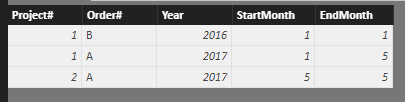
In data view mode, create below summarized table with DAX:
Test_3 =
SUMMARIZE (
Test_2,
Test_2[Project#],
Test_2[Order#],
Test_2[Year],
"StartMonth", MIN ( Test_2[MonthNumber] ),
"EndMonth", MAX ( Test_2[MonthNumber] )
)
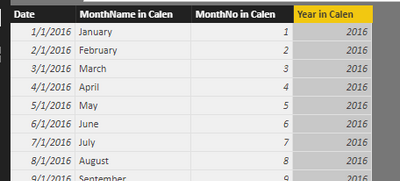
Create a calendar table and add Year, Month columns to it.
calendar TB =
FILTER (
CALENDAR ( DATE ( 2016, 1, 1 ), DATE ( 2017, 12, 31 ) ),
DAY ( [Date] ) = 1
)
MonthName in Calen = [Date].[Month]
MonthNo in Calen = [Date].[MonthNo]
Year in Calen = [Date].[Year]
Cross join above two tables.
Test_4 =
SELECTCOLUMNS (
FILTER (
CROSSJOIN ( Test_3, 'calendar TB' ),
'calendar TB'[MonthNo in Calen] >= Test_3[StartMonth]
&& 'calendar TB'[MonthNo in Calen] <= Test_3[EndMonth]
&& Test_3[Year] = 'calendar TB'[Year in Calen]
),
"Project#", [Project#],
"Order#", [Order#],
"Month", [MonthName in Calen],
"Year", [Year]
)
Best regards,
Yuliana Gu
Hi @Anonymous,
First, please add a conditional column in original table (suppose it's 'Test_2') in query editor mode.
In data view mode, create below summarized table with DAX:
Test_3 =
SUMMARIZE (
Test_2,
Test_2[Project#],
Test_2[Order#],
Test_2[Year],
"StartMonth", MIN ( Test_2[MonthNumber] ),
"EndMonth", MAX ( Test_2[MonthNumber] )
)
Create a calendar table and add Year, Month columns to it.
calendar TB =
FILTER (
CALENDAR ( DATE ( 2016, 1, 1 ), DATE ( 2017, 12, 31 ) ),
DAY ( [Date] ) = 1
)
MonthName in Calen = [Date].[Month]
MonthNo in Calen = [Date].[MonthNo]
Year in Calen = [Date].[Year]
Cross join above two tables.
Test_4 =
SELECTCOLUMNS (
FILTER (
CROSSJOIN ( Test_3, 'calendar TB' ),
'calendar TB'[MonthNo in Calen] >= Test_3[StartMonth]
&& 'calendar TB'[MonthNo in Calen] <= Test_3[EndMonth]
&& Test_3[Year] = 'calendar TB'[Year in Calen]
),
"Project#", [Project#],
"Order#", [Order#],
"Month", [MonthName in Calen],
"Year", [Year]
)
Best regards,
Yuliana Gu
Advance your Data & AI career with 50 days of live learning, contests, hands-on challenges, study groups & certifications and more!
Check out the October 2025 Power BI update to learn about new features.