cancel
Showing results for 
Search instead for 
Did you mean: 

We've captured the moments from FabCon & SQLCon that everyone is talking about, and we are bringing them to the community, live and on-demand. Starts on April 14th. Register now

Reply
darliusk
Frequent Visitor

How to maintain customer category sales data when they change segments/silos

Hello


Although this may already be covered somewhere, I could not find it on my searches.


I have a sales dashboard which allocates customers into different segments ("silos") based on anticipated revenue sales.


Over the course of time, some customers may be moved into a different segment (Platinum, Distributor, Wholesale, Retail) if their sales performance changes.


Currently, I have set up my customer dataset to include segment information (Customer code, Customer Name, Silo(Segment), State, Country, Region), however, if I were to change the segment variable on this dataset, it will also change the historical sales data, moving it over to the new segment.


How do I retain a customers historical sales information in their old segment up to the date they change in the new segment?


I gather I will need to split out Segment into a new dataset (with Customer code as the Primary Key), and then use an IF statement in DAX (with state and end dates), but am not sure how to do it.


Please help me find the most simple and elegant way to do this.


If you think there is a better way, I am open to suggestions, so long as it does not mean a massive change to my schema.


Regards


Darliusk

1 ACCEPTED SOLUTION
TomasAndersson
Solution Sage
Solution Sage

Hi!
Yes, some variation of what you're suggesting is probably the easiest solution.


I made a simple model and a measure to try it out. You can see if can give you a few ideas of how to solve your problem.

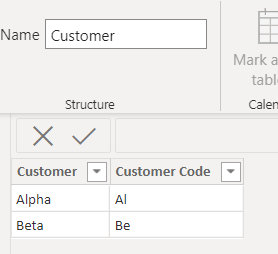
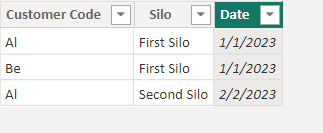
Two simple tables, a dimension Customer table and a fact Silo table:

TomasAndersson_1-1675313312918.pngTomasAndersson_2-1675313333028.png

Notice that Al has two entries in Silo with different date, one in Jan and one in Feb.


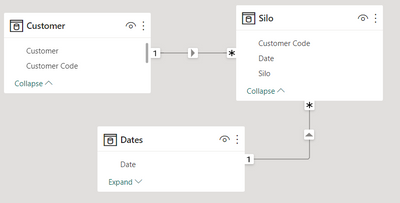
Then a simple model with these two + a date table: 


TomasAndersson_0-1675313275585.png


And a measure to find Silo based on date:


Current Silo = 
if(
    ISINSCOPE(Customer[Customer]),
        CALCULATE(LOOKUPVALUE(Silo[Silo],Silo[Date],LASTDATE(Silo[Date])),
            FILTER(ALL(Dates[Date]), Dates[Date] <= max(Dates[Date])
            )
        )
)


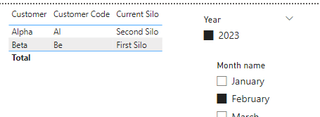
Result:

TomasAndersson_4-1675313440858.pngTomasAndersson_5-1675313456378.png


With that you should be able to do calculations that depend on what silo a customer belongs to at a given date. Not sure if it covers all you need, but hopefully a start.


Good luck!


View solution in original post

2 REPLIES 2
darliusk
Frequent Visitor

 Thanks @TomasAndersson , this looks like a solid foundation to my question. Appreciate the assistance!

@darliusk 

TomasAndersson
Solution Sage
Solution Sage

Hi!
Yes, some variation of what you're suggesting is probably the easiest solution.


I made a simple model and a measure to try it out. You can see if can give you a few ideas of how to solve your problem.

Two simple tables, a dimension Customer table and a fact Silo table:

TomasAndersson_1-1675313312918.pngTomasAndersson_2-1675313333028.png

Notice that Al has two entries in Silo with different date, one in Jan and one in Feb.


Then a simple model with these two + a date table: 


TomasAndersson_0-1675313275585.png


And a measure to find Silo based on date:


Current Silo = 
if(
    ISINSCOPE(Customer[Customer]),
        CALCULATE(LOOKUPVALUE(Silo[Silo],Silo[Date],LASTDATE(Silo[Date])),
            FILTER(ALL(Dates[Date]), Dates[Date] <= max(Dates[Date])
            )
        )
)


Result:

TomasAndersson_4-1675313440858.pngTomasAndersson_5-1675313456378.png


With that you should be able to do calculations that depend on what silo a customer belongs to at a given date. Not sure if it covers all you need, but hopefully a start.


Good luck!


Helpful resources

Announcements
New to Fabric survey Carousel

New to Fabric Survey

If you have recently started exploring Fabric, we'd love to hear how it's going. Your feedback can help with product improvements.

Power BI DataViz World Championships carousel

Power BI DataViz World Championships - June 2026

A new Power BI DataViz World Championship is coming this June! Don't miss out on submitting your entry.

Join our Fabric User Panel

Join our Fabric User Panel

Share feedback directly with Fabric product managers, participate in targeted research studies and influence the Fabric roadmap.

March Power BI Update Carousel

Power BI Community Update - March 2026

Check out the March 2026 Power BI update to learn about new features.