Become a Certified Power BI Data Analyst!
Join us for an expert-led overview of the tools and concepts you'll need to pass exam PL-300. The first session starts on June 11th. See you there!
Get registered- Power BI forums
- Get Help with Power BI
- Desktop
- Service
- Report Server
- Power Query
- Mobile Apps
- Developer
- DAX Commands and Tips
- Custom Visuals Development Discussion
- Health and Life Sciences
- Power BI Spanish forums
- Translated Spanish Desktop
- Training and Consulting
- Instructor Led Training
- Dashboard in a Day for Women, by Women
- Galleries
- Webinars and Video Gallery
- Data Stories Gallery
- Themes Gallery
- Contests Gallery
- Quick Measures Gallery
- Notebook Gallery
- Translytical Task Flow Gallery
- R Script Showcase
- Ideas
- Custom Visuals Ideas (read-only)
- Issues
- Issues
- Events
- Upcoming Events
Power BI is turning 10! Let’s celebrate together with dataviz contests, interactive sessions, and giveaways. Register now.
- Power BI forums
- Forums
- Get Help with Power BI
- Desktop
- Re: How to lookup the values of a column inside a ...
- Subscribe to RSS Feed
- Mark Topic as New
- Mark Topic as Read
- Float this Topic for Current User
- Bookmark
- Subscribe
- Printer Friendly Page


- Mark as New
- Bookmark
- Subscribe
- Mute
- Subscribe to RSS Feed
- Permalink
- Report Inappropriate Content
How to lookup the values of a column inside a tables' columns
Hi, i am trying to generate a column based on values coming from a different table.
Situation is as below:
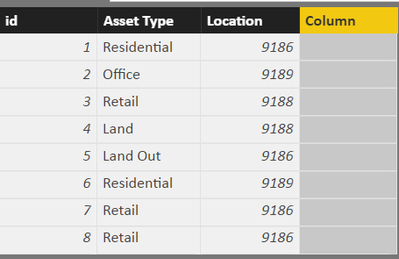

There is a link from "Location Code" to "Location" (one to many).
Now, based on "Location" and "Asset Type" the formula should check the Lookup table and return back a number (Performed in Excel with functions INDEX and MATCH).
How can this be achieved through DAX please?
Maybe i should build the Lookup table differently? Any ideas?
Solved! Go to Solution.


- Mark as New
- Bookmark
- Subscribe
- Mute
- Subscribe to RSS Feed
- Permalink
- Report Inappropriate Content
Following formula should also give same results
Column =
LOOKUPVALUE (
    UnpivotedTable[Value],
    UnpivotedTable[Attribute], MainTable[Asset type],
    UnpivotedTable[Location Code], MainTable[Location]
)
Regards
Zubair
Please try my custom visuals
- Mark as New
- Bookmark
- Subscribe
- Mute
- Subscribe to RSS Feed
- Permalink
- Report Inappropriate Content
Hi@satlasg
Just Unpivot your columns in LookUpTable (all columns other than Location Code)
Then you can use this calculated column formula in your Table with New Column
=Related(LookupTable[Values])
Regards
Zubair
Please try my custom visuals
- Mark as New
- Bookmark
- Subscribe
- Mute
- Subscribe to RSS Feed
- Permalink
- Report Inappropriate Content
Hi @Zubair_Muhammad,
tried the Unpivot but it couldnt possibly work, since it creates duplicates, so cannot build relation.
Any idea what am i doing wrong?
- Mark as New
- Bookmark
- Subscribe
- Mute
- Subscribe to RSS Feed
- Permalink
- Report Inappropriate Content
You are right
Actually relationship is based on 2 columns after unpivoting I. E. ASSET TYPE and Location code
You can use lookup value dax function now to get the desired results
If you can share your file via googledrive or one drive, I will try to get you the result
Regards
Zubair
Please try my custom visuals
- Mark as New
- Bookmark
- Subscribe
- Mute
- Subscribe to RSS Feed
- Permalink
- Report Inappropriate Content
After UnPivot, i am left with those two unrelated tables:
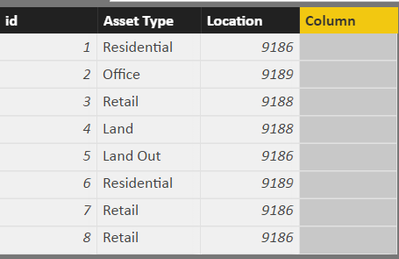
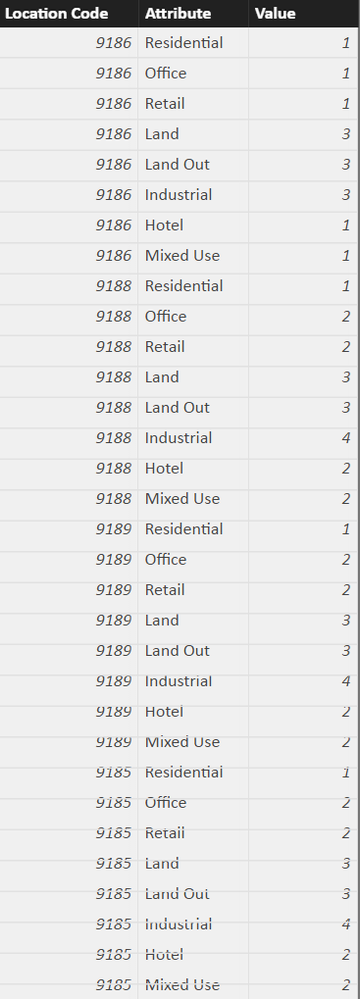
Cannot create a LookupValue funtion that will bring me the corrensponding Value in the first table.
- Mark as New
- Bookmark
- Subscribe
- Mute
- Subscribe to RSS Feed
- Permalink
- Report Inappropriate Content
Hi @satlasg
Try this Calculated Column in your MainTable
(i.e. after unpivoting the LookUpTable)
Please change TableNames according to your case
Column =
CALCULATE (
    FIRSTNONBLANK ( UnpivotedTable[Value], 1 ),
    FILTER (
        UnpivotedTable,
        UnpivotedTable[Attribute] = MainTable[Asset type]
            && UnpivotedTable[Location Code] = MainTable[Location]
    )
)
Regards
Zubair
Please try my custom visuals
- Mark as New
- Bookmark
- Subscribe
- Mute
- Subscribe to RSS Feed
- Permalink
- Report Inappropriate Content
Following formula should also give same results
Column =
LOOKUPVALUE (
    UnpivotedTable[Value],
    UnpivotedTable[Attribute], MainTable[Asset type],
    UnpivotedTable[Location Code], MainTable[Location]
)
Regards
Zubair
Please try my custom visuals
- Mark as New
- Bookmark
- Subscribe
- Mute
- Subscribe to RSS Feed
- Permalink
- Report Inappropriate Content
Great, thank you, both work, the second looks more straightforward.
Just a note, in the first one, changing the second attribute of FIRSTNONBLANK to either 0, 2, 3, or even "" does not seem to have an effect.


- Mark as New
- Bookmark
- Subscribe
- Mute
- Subscribe to RSS Feed
- Permalink
- Report Inappropriate Content
I am trying to do the same, any chance you can share an example file please.
Many thanks
Paul

Helpful resources

Join our Fabric User Panel
This is your chance to engage directly with the engineering team behind Fabric and Power BI. Share your experiences and shape the future.

Power BI Monthly Update - June 2025
Check out the June 2025 Power BI update to learn about new features.

Fabric Community Update - June 2025
Find out what's new and trending in the Fabric community.

| User | Count |
|---|---|
| 84 | |
| 76 | |
| 73 | |
| 42 | |
| 36 |


| User | Count |
|---|---|
| 109 | |
| 56 | |
| 52 | |
| 48 | |
| 43 |


