Join us at FabCon Atlanta from March 16 - 20, 2026, for the ultimate Fabric, Power BI, AI and SQL community-led event. Save $200 with code FABCOMM.
Register now!The Power BI Data Visualization World Championships is back! Get ahead of the game and start preparing now! Learn more
Hi all,
I need to generate a report on gaming tournament using data in two tables.
The first is a session history table showing general gameplay session data (main data table). The second is a tournaments table which ties the name of a tournament, which the game guid of the game played in the tournament (there is a relationship between the two tables based on this unique value), and the start and end dates of the tournament period.
I need to show, amongst other things, unique players in the tournament.
I can do this easily statically, but I need to create a drop down selection of the available tournaments, which I can do using a slicer, but I am stuck when it come to fetching the associated date range, and applying that as a filter to my report.
Any guidance will be gratefully received. I am a relative noob, and whilst this sound like a fairly simple ask, I am not sure where to start.
Thanks!
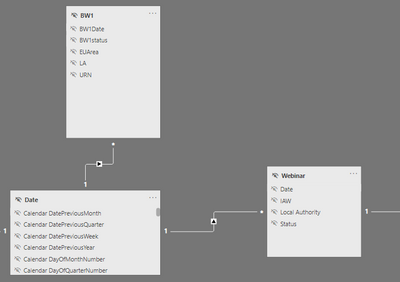
From what it sounds like, It sounds like you need to add a third table, which is simply a table of dates (see below link) -
https://kohera.be/blog/power-bi/how-to-create-a-date-table-in-power-bi-in-2-simple-steps/
Then, simply create a relationship between each table and the date table, similar to below -
and it should work.
Hi @Anonymous ,
Thanks for the response.
I am not sure how this will apply a start and end date range to the original query?
Maybe I am missing something?
Thanks
Hi @ksfx77 ,
I may be missing something.
What do you want to show in the slicers ?
Regards,
Harsh Nathani
Appreciate with a Kudos!! (Click the Thumbs Up Button)
Did I answer your question? Mark my post as a solution!
Hi @harshnathani ,
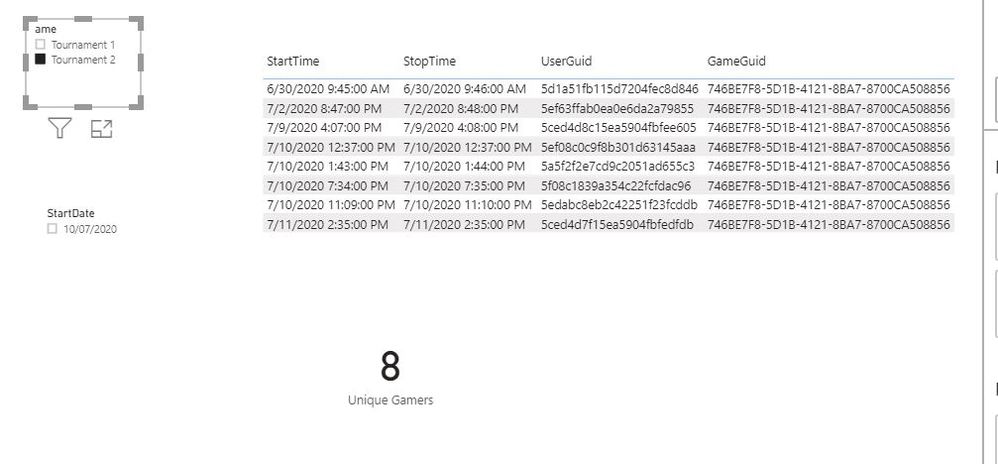
Basically I have a table of data showing gameplay, and a table of tournaments, which specify the game and date range that needs to be applied as filters. I need to have a drop down menu to select the tournament name, and based on this selection apply the correct gameguid and date range filters to the session history table to show relevant gameplay.
I can get this to work for the gameguid, which I have a relationship based on, but it does not apply the correct date range.
Thanks!
Kevin
@ksfx77 , Difficult to tell without data. Can you share sample data and sample output in table format?
See if this can help
Hi @amitchandak,
Here you go.
session_history
| GameGuid | UserGuid | StartTime | StopTime |
| 746BE7F8-5D1B-4121-8BA7-8700CA508856 | 5ef08c0c9f8b301d63145aaa | 10/07/2020 12:37 | 10/07/2020 12:37 |
| 746BE7F8-5D1B-4121-8BA7-8700CA508856 | 5a5f2f2e7cd9c2051ad655c3 | 10/07/2020 13:43 | 10/07/2020 13:44 |
| 746BE7F8-5D1B-4121-8BA7-8700CA508856 | 5edabc8eb2c42251f23fcddb | 10/07/2020 23:09 | 10/07/2020 23:10 |
| A2BA005D-84D9-47C8-BDBB-21EC61E1E9A9 | 5ef204d2d12efa61aa083d1b | 19/07/2020 17:37 | 19/07/2020 17:38 |
| 746BE7F8-5D1B-4121-8BA7-8700CA508856 | 5ef63ffab0ea0e6da2a79855 | 02/07/2020 20:47 | 02/07/2020 20:48 |
| 746BE7F8-5D1B-4121-8BA7-8700CA508856 | 5f08c1839a354c22fcfdac96 | 10/07/2020 19:34 | 10/07/2020 19:35 |
| 746BE7F8-5D1B-4121-8BA7-8700CA508856 | 5ced4d8c15ea5904fbfee605 | 09/07/2020 16:07 | 09/07/2020 16:08 |
| A2BA005D-84D9-47C8-BDBB-21EC61E1E9A9 | 5ef204d2d12efa61aa083d1b | 17/07/2020 22:17 | 17/07/2020 22:19 |
| 746BE7F8-5D1B-4121-8BA7-8700CA508856 | 5ced4d7f15ea5904fbfedfdb | 11/07/2020 14:35 | 11/07/2020 14:35 |
| 746BE7F8-5D1B-4121-8BA7-8700CA508856 | 5d1a51fb115d7204fec8d846 | 30/06/2020 09:45 | 30/06/2020 09:46 |
tournaments
| Name | StartDate | EndDate | GameGuid |
| Tournament 1 | 17/07/2020 | 20/07/2020 | A2BA005D-84D9-47C8-BDBB-21EC61E1E9A9 |
| Tournament 2 | 10/07/2020 | 13/07/2020 | 746BE7F8-5D1B-4121-8BA7-8700CA508856 |
Hope this helps.
Thanks.
The Power BI Data Visualization World Championships is back! Get ahead of the game and start preparing now!
Check out the November 2025 Power BI update to learn about new features.
| User | Count |
|---|---|
| 59 | |
| 46 | |
| 42 | |
| 23 | |
| 18 |
| User | Count |
|---|---|
| 193 | |
| 123 | |
| 99 | |
| 67 | |
| 49 |