cancel
Showing results for 
Search instead for 
Did you mean: 

Data Days is here! Join us now for 60+ days of learning, challenges, and connection. Learn more

Reply
Anonymous
Not applicable

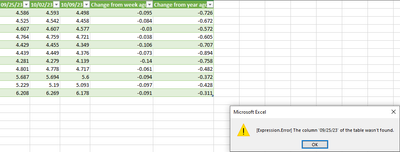
How to ignore/avoid [Expression Error] The column '9/25/23' of the table wasn't found.

I have loaded a query from the web that has the last three weeks of price history. This history is updated weekly, so when a new week populates a column, the oldest week is kicked out. This update is giving me an expression error because the oldest week cannot be found on the table. The information I need is in a single cell of the latest price history, so older history can be ignored. The only solutions I have found so far is to manually remove the column in the editor which is something I do not want to continue to do.


Is there a way to completely ignore the error message and have the table update with the new week? Or is there a way to update the entire table so that I don't get an error at all?


I have screenshotted my issue below.
 

SodaAsher_1-1697721314243.png


1 ACCEPTED SOLUTION
lbendlin
Super User
Super User

You need to unpivot that data so you are protected from column name changes for these columns. After unpivoting you will always have just two columns, and no need to update the code.

View solution in original post

3 REPLIES 3
Anonymous
Not applicable

Thank you lbendlin! Your solution seems to have worked. My issue now is that when I refer to the single cell that has the price, I get an "#N/A" in cells that interact with it.


For example, Cell A2 has =(cell with price). Cell B2 has =VLOOKUP(A2,'FSC1'!H:K,4,TRUE). Cell B2 populates with "N/A" where previously if I simply type in the price manually it populates with the correct result. Any insight would be greatly appreciated again. Result with Linked Price.pngResult with Manual Input Price.png

In Power Query you can use "Replace Errors", "Remove Errors", or the try...otherwise... construct to deal with these issues (which frankly should be solved further upstream, in Excel).

lbendlin
Super User
Super User

You need to unpivot that data so you are protected from column name changes for these columns. After unpivoting you will always have just two columns, and no need to update the code.

Helpful resources

Announcements
Fabric Data Days is here Carousel

Fabric Data Days 2026

Don't miss out on Data Days, June 15 through August 7. Learn Fabric, Power BI, SQL, AI and more.

May Power BI Update Carousel

Power BI Monthly Update - May 2026

Check out the May 2026 Power BI update to learn about new features.

Power BI DataViz World Championships carousel

Power BI DataViz World Championships - June 2026

A new Power BI DataViz World Championship is coming this June! Don't miss out on submitting your entry.

