FabCon is coming to Atlanta
Join us at FabCon Atlanta from March 16 - 20, 2026, for the ultimate Fabric, Power BI, AI and SQL community-led event. Save $200 with code FABCOMM.
Register now!- Power BI forums
- Get Help with Power BI
- Desktop
- Service
- Report Server
- Power Query
- Mobile Apps
- Developer
- DAX Commands and Tips
- Custom Visuals Development Discussion
- Health and Life Sciences
- Power BI Spanish forums
- Translated Spanish Desktop
- Training and Consulting
- Instructor Led Training
- Dashboard in a Day for Women, by Women
- Galleries
- Data Stories Gallery
- Themes Gallery
- Contests Gallery
- QuickViz Gallery
- Quick Measures Gallery
- Visual Calculations Gallery
- Notebook Gallery
- Translytical Task Flow Gallery
- TMDL Gallery
- R Script Showcase
- Webinars and Video Gallery
- Ideas
- Custom Visuals Ideas (read-only)
- Issues
- Issues
- Events
- Upcoming Events
The Power BI Data Visualization World Championships is back! Get ahead of the game and start preparing now! Learn more
- Power BI forums
- Forums
- Get Help with Power BI
- Desktop
- How to hide subtotals for few columns in a matrix ...
- Subscribe to RSS Feed
- Mark Topic as New
- Mark Topic as Read
- Float this Topic for Current User
- Bookmark
- Subscribe
- Printer Friendly Page

- Mark as New
- Bookmark
- Subscribe
- Mute
- Subscribe to RSS Feed
- Permalink
- Report Inappropriate Content
How to hide subtotals for few columns in a matrix on power BI desktop?
Within power BI desktop, i am not able to hide few columns subtotals. I can either hide all or show all for subtotals. Is it possible to hide subtotals for few columns and show on others with a matrix?

- Mark as New
- Bookmark
- Subscribe
- Mute
- Subscribe to RSS Feed
- Permalink
- Report Inappropriate Content
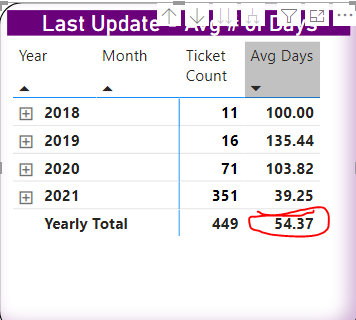
Wondering if there a way to only hide the Avg Days total in the matrix table, circled, below?

- Mark as New
- Bookmark
- Subscribe
- Mute
- Subscribe to RSS Feed
- Permalink
- Report Inappropriate Content
Anyone solve this? I have a calculation that makes sense at the line item level but makes no sense summed up. Is there a way to hide the Total and Subtotals for this?
- Mark as New
- Bookmark
- Subscribe
- Mute
- Subscribe to RSS Feed
- Permalink
- Report Inappropriate Content
Hi,
You can create a new measure to do this. Inside it you will check if value is equal or higher than minimum with simple if.
That's how I have done this.
Measure= IF(SUM('Table'[some_value])>=(MIN('Table'[some_value])+1);BLANK();SUM('Table'[some_value]))
Instead of +1 you can use smaller value if needed. Depends from your data.
Below standard column first and measure in second column
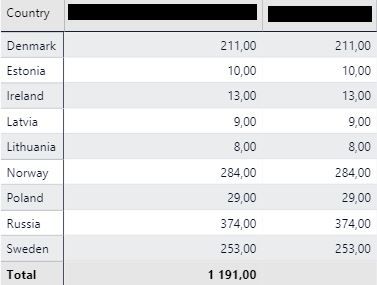
Other option is to play with ALLEXCEPT but this might be harder in regards to slicers
Hope it will help someone.


- Mark as New
- Bookmark
- Subscribe
- Mute
- Subscribe to RSS Feed
- Permalink
- Report Inappropriate Content
Hi,
On the same lines I was able to hide subtotal for a numeric and date column.
Numeric Column: Created a measure:
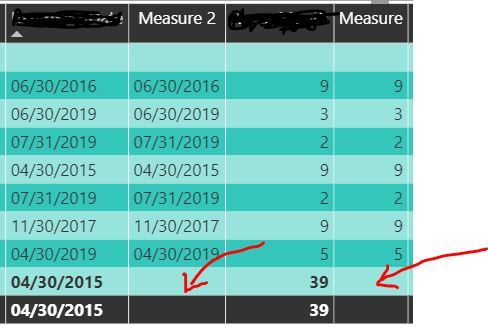 Hiding Subtotal selectively in Power BI


- Mark as New
- Bookmark
- Subscribe
- Mute
- Subscribe to RSS Feed
- Permalink
- Report Inappropriate Content
Yes, This would definitely work for hiding unnecessary totals/subtotals like dates, names, etc. on matrix columns. However if your Matrix rows contain Groups/Hirearchies then you will come up with all the line item in your table appearing in each group:
For example I created the following measure to hide account numbers in subtotals and Total:
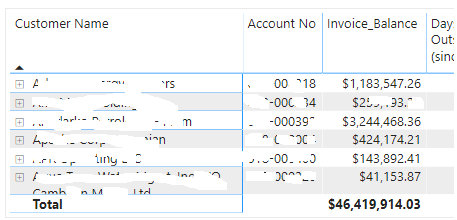
 Expanding first Hierarchy (account managers); should only show one record
- Mark as New
- Bookmark
- Subscribe
- Mute
- Subscribe to RSS Feed
- Permalink
- Report Inappropriate Content
I just found the solution:
I used the following measure for Account number:
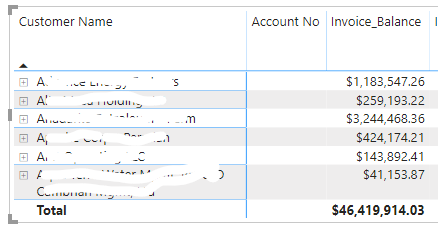 Highest Group level : Customers
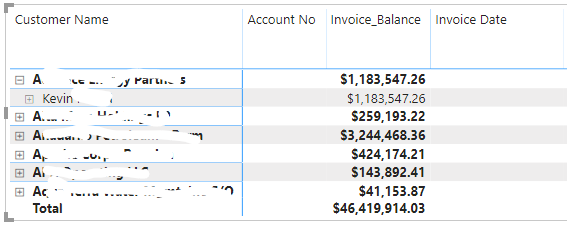 Expanding the Group to 2nd Level: Account Managers
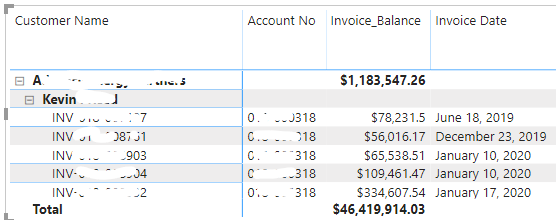 Lowest level of hierarchy: Invoices (Invoice ID)
- Mark as New
- Bookmark
- Subscribe
- Mute
- Subscribe to RSS Feed
- Permalink
- Report Inappropriate Content
I have the same issue. I don't think the March 17 Preview addresses the ability to selectively hide some subtotal columns.
Is there anything new that might address this?
Helpful resources

Power BI Dataviz World Championships
The Power BI Data Visualization World Championships is back! Get ahead of the game and start preparing now!

Power BI Monthly Update - December 2025
Check out the December 2025 Power BI Holiday Recap!

FabCon Atlanta 2026
Join us at FabCon Atlanta, March 16-20, for the ultimate Fabric, Power BI, AI and SQL community-led event. Save $200 with code FABCOMM.

| User | Count |
|---|---|
| 41 | |
| 38 | |
| 33 | |
| 29 | |
| 24 |


| User | Count |
|---|---|
| 127 | |
| 115 | |
| 87 | |
| 70 | |
| 69 |


