Join us at FabCon Atlanta from March 16 - 20, 2026, for the ultimate Fabric, Power BI, AI and SQL community-led event. Save $200 with code FABCOMM.
Register now!Get Fabric Certified for FREE during Fabric Data Days. Don't miss your chance! Request now
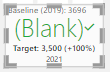
KPI visual shows BLANK() when there is a GOAL but not callout value.
I tried creating a measure to modify the green colour and show it white (#ffffff) to hide the Blank() within the background with this:
Solved! Go to Solution.
Thanks for your answers, but... placing a 0 does not work, because 0 means 0 and it's different than blank. Also, the second option is not valid for KPI visual, which needs a numeric number.
The solution I found was using LEN(). if (LEN(measure) >0, #colour, #transparent)
Thanks for your answers, but... placing a 0 does not work, because 0 means 0 and it's different than blank. Also, the second option is not valid for KPI visual, which needs a numeric number.
The solution I found was using LEN(). if (LEN(measure) >0, #colour, #transparent)
Hi HoracioRek
Please consider these 2 options and click thumbs up and accept as solution buttons. Thanks 😎
I have added comments to expalin how they work
Answer1 =
// By adding zero you can force dax to always return 0 instead of blank
0 +
LASTNONBLANKVALUE('RAM Indicator ratings'[Target value],0)
Answer2 =
// Use the if command to return "" insteas of blanks
VAR answer = LASTNONBLANKVALUE('RAM Indicator ratings'[Target value],0)
Check out the November 2025 Power BI update to learn about new features.
Advance your Data & AI career with 50 days of live learning, contests, hands-on challenges, study groups & certifications and more!