cancel
Showing results for 
Search instead for 
Did you mean: 

Get Fabric Certified for FREE during Fabric Data Days. Don't miss your chance! Request now

Reply
DominikF
New Member

How to handle and identify process duration, to present them on a bar chart


Hello Power BI guys! 


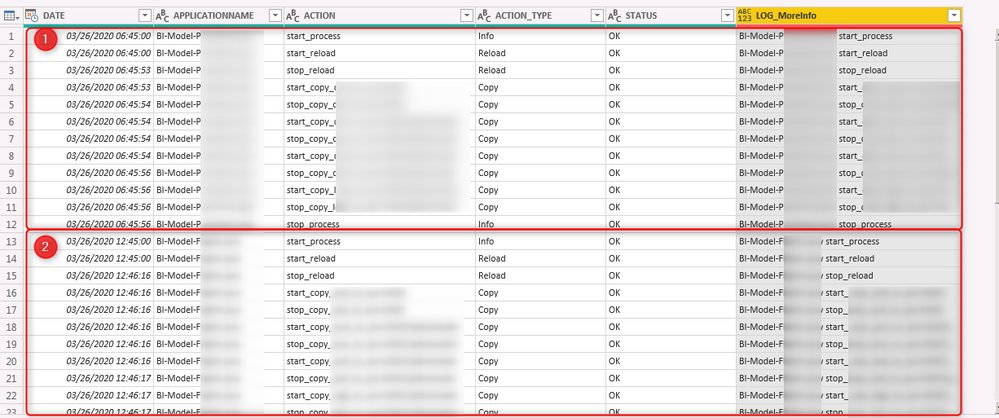
I'm facing a problem to find the best way to prepare my data for visualisations. I have multipe processes with the same name in one log file that i want to analyze. The processes got diffrent names, but the action is same for each of them (Start, Stop etc.) 
Can you tell me, what will be the best way, to prepare such kind of data ? 

Finaly I want to present these processes on a bar chart, represented by hour for each day and processed during them.


Example (1: first process, 2: second process):

screenshot_14.png
Thank you in advance!

Dominik

1 REPLY 1
Greg_Deckler
Community Champion
Community Champion

See my article on Mean Time Between Failure (MTBF) which uses EARLIER: http://community.powerbi.com/t5/Community-Blog/Mean-Time-Between-Failure-MTBF-and-Power-BI/ba-p/3395...


Follow on LinkedIn
@ me in replies or I'll lose your thread!!!
Instead of a Kudo, please vote for this idea
Become an expert!: Enterprise DNA
External Tools: MSHGQM
YouTube Channel!: Microsoft Hates Greg
Latest book!:
DAX For Humans

DAX is easy, CALCULATE makes DAX hard...

Helpful resources

Announcements
November Power BI Update Carousel

Power BI Monthly Update - November 2025

Check out the November 2025 Power BI update to learn about new features.

Fabric Data Days Carousel

Fabric Data Days

Advance your Data & AI career with 50 days of live learning, contests, hands-on challenges, study groups & certifications and more!

FabCon Atlanta 2026 carousel

FabCon Atlanta 2026

Join us at FabCon Atlanta, March 16-20, for the ultimate Fabric, Power BI, AI and SQL community-led event. Save $200 with code FABCOMM.

Top Solution Authors
Top Kudoed Authors